0 ratings

Item #:
1234335
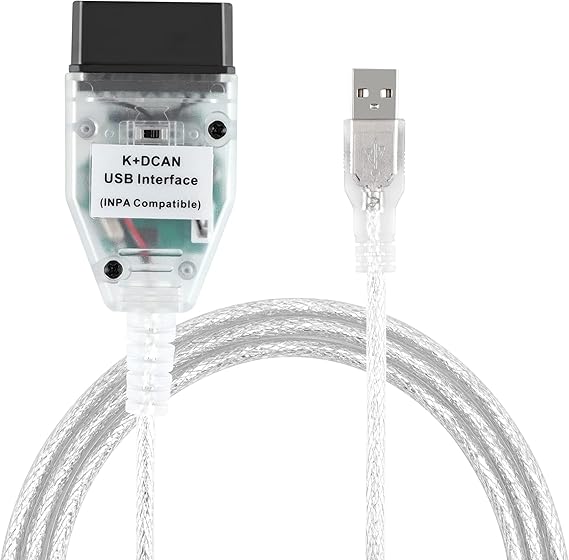
LZLRUN K+CAN K+DCAN Car Diagnostic Scanner Cable OBD USB Interface with Switch for BMW with FT232RL NCS Expert Tool32
Item #:
1234335
KES 6960
Price Details
Excluding Shipping & Custom charges ( Shipping and custom charges will be calculated on checkout )
*All items will import from US
0 ratings
Write a review
In stock
 Imported from USA store
QTY:
Order now and get it around Tuesday, June 30
Secured transaction
Ubuy works hard to protect your security and privacy. Our advanced payment security system ensures confidentiality by encrypting your information during transmission using AES (Advanced Encryption Standards) and SSL (Secure Socket Layer) protocols. Your payment details are 100% secure as we do not share your payment details with third party sellers.
Our Top Logistics Partners


Interface USB OBD2 for BMW - Ediabas - K+DCAN allows full diagnostic for BMW from 1998 to 2019 (all functions as in OMNITEC interface).

Fast
Shipping

Free
Return*

Secure Packaging

100% Original Products

PCI DSS Compliance

ISO 27001 Certified


Note: Step Down Voltage Transformer required for using electronics products of US store (110-120). Recommended power converters Buy Now.


What Stands Out
Advanced Compatibility
Designed specifically for BMW vehicles, this diagnostic tool offers seamless communication with various BMW models, ensuring broad support and reliable performance for enthusiasts and professionals alike.
Efficient Coding
Equipped with FT232RL, the K+CAN tool enables advanced coding and programming capabilities, allowing users to perform NCS coding and Winkfp programming effortlessly, maximizing vehicle customization and functionality.
User-Friendly Interface
The integrated USB interface with a switch simplifies the connection process, making it easy for users of all skill levels to access and utilize diagnostic features without extensive technical know-how.
Product Details
- Provides technical support through Teamviewer remote control with professional BMW diagnosis engineer
- Newest version V5.0.6, compatible with BMW cars built from 1998 to 2018
- Works with INPA, SSS, Progman, and others for full diagnostics
- Reads and deletes error memory, car and key memory fit, Codieren for programming, service interval-reset
- Supports Fast magistral D-CAN, PT-CAN, Slow magistral K-CAN, and Standard BMW protocol
- Package includes 1x BMW INPA Interface and 1x CD
| Item Weight | 0.5 lbs (230 grams) |
Who Should Buy?

-
BMW Enthusiasts
Ideal for BMW owners interested in performing self-diagnostics and programming their vehicles for personalized settings.
-
Professional Mechanics
Suitable for mechanics specializing in BMW cars, facilitating efficient diagnostics and software updates.
-
DIY Technicians
Great for hobbyist technicians who enjoy coding and customizing their BMW vehicles without relying on dealership services.

-
Casual Drivers
Not suitable for everyday drivers who do not require advanced diagnostics or programming features for their cars.
-
Non-BMW Owners
This tool is specifically designed for BMW models and won't work effectively on other car brands or types.
-
Technophobes
Not ideal for users uncomfortable with technology, as setup and operation may be complex without guidance.
Product Description
LZLRUN K+CAN K+DCAN Car Diagnostic Scanner Cable OBD USB Interface with Switch for BMW with FT232RL NCS Expert Tool32
Have any Query? Chat with us
Customer Questions & Answers
-
Question:
What is the LZLRUN KCAN KDCAN Car Diagnostic Tool used for?
Answer: The LZLRUN KCAN KDCAN Car Diagnostic Tool is primarily used for diagnosing issues in BMW vehicles. It enables users to access diagnostic trouble codes, perform NCS coding, and utilize functions like Winkfp for programming modules. This tool is perfect for automotive enthusiasts or professional mechanics who need to troubleshoot and reprogram BMW systems. By addressing vehicle problems directly, users can maintain their cars more efficiently and customize features that aren’t accessible through standard diagnostic methods. -
Question:
How does the OBD USB interface function?
Answer: The OBD USB interface connects your vehicle to a computer or laptop, allowing the transfer of diagnostic information. It works by utilizing a software application that interprets the data from your car’s onboard diagnostic system. This interface is crucial for accessing real-time information and performing specific operations without needing specialized equipment. For example, you can use it to read fault codes, clear warning lights, and even program new features in your BMW, making it an invaluable tool for both hobbyists and professionals. -
Question:
What software is compatible with the LZLRUN KCAN KDCAN tool?
Answer: The LZLRUN KCAN KDCAN tool is compatible with popular software applications such as INPA, NCS Expert, E-sys, WinKFP, and Tool32. These programs are essential for comprehensive vehicle diagnostics, coding, and module programming. For instance, using NCS Expert allows users to customize vehicle settings, enhancing the functionality of features like lighting and central locking. The versatility of these software options makes this tool an essential addition to your BMW maintenance toolkit. -
Question:
Can the LZLRUN KCAN KDCAN tool work with all BMW models?
Answer: While the LZLRUN KCAN KDCAN tool is designed for a broad range of BMW models, compatibility may vary, especially with newer vehicles. It typically supports models produced from around 1998 to 2017, covering most popular BMW categories. Therefore, before purchase, it's advisable to check your specific model's compatibility to ensure seamless operation. This approach helps you maximize the tool's capabilities, allowing you to access various vehicle functions relevant to your BMW. -
Question:
Is the LZLRUN KCAN KDCAN tool user-friendly?
Answer: Yes, the LZLRUN KCAN KDCAN tool is designed to be user-friendly, even for those with limited technical expertise. The software interfaces are generally straightforward, and many online tutorials are available for guidance. Whether you’re a beginner or a seasoned technician, you can navigate the diagnostic processes with relative ease. The intuitive layout of coding tools and clear instructions enable users to perform diagnostic tests, making it accessible for all skill levels. -
Question:
What features does the switch on the cable provide?
Answer: The switch on the LZLRUN KCAN KDCAN cable allows users to toggle between K-CAN and DCAN protocols easily. This feature is crucial when working with different BMW models that may require different communication methods. By using the switch, you can ensure that the tool functions correctly with the vehicle’s system, enhancing the accuracy of diagnostics and coding functions. It provides flexibility and convenience, allowing for various functionalities depending on the specific model being serviced. -
Question:
How can I perform module programming with this tool?
Answer: Module programming with the LZLRUN KCAN KDCAN tool can be accomplished using applications like WinKFP. This software enables users to update control modules with the latest firmware or swap out modules that may be malfunctioning. To do this, users connect their laptop to the vehicle's OBD port using the tool, then follow prompts within the software to select the target module. Proper programming ensures that all vehicle features operate correctly and efficiently, thereby improving the functionality of your BMW. -
Question:
What are the typical diagnostic tasks performed with this tool?
Answer: Typical diagnostic tasks performed using the LZLRUN KCAN KDCAN tool include reading and clearing trouble codes, performing live data analysis, coding vehicle features, and programming control modules. These tasks are essential for troubleshooting mechanical and electronic issues in BMW vehicles. For instance, if your dashboard displays a check engine light, this tool will allow you to identify the specific problem and rectify it without visiting a workshop, thus saving time and effort. -
Question:
Where can I buy the LZLRUN KCAN KDCAN Car Diagnostic Tool?
Answer: You can buy the LZLRUN KCAN KDCAN Car Diagnostic Tool Cable OBD USB Interface with Switch for BMW from Ubuy. They offer a reliable purchasing platform where you're likely to find competitive pricing, detailed product descriptions, and reviews from other customers. This makes Ubuy a convenient option for acquiring this diagnostic tool while ensuring you have all the necessary information to make an informed choice. -
Question:
Does the tool come with installation instructions?
Answer: Yes, the LZLRUN KCAN KDCAN tool typically comes with installation instructions provided in the packaging or through downloadable manuals. These instructions guide users through the setup process of the software and the connection of the tool to their vehicle. Additionally, many users share valuable experiences and tips on platforms like forums, which can help enhance your understanding of the tool's operation. This aspect ensures users can get started quickly and troubleshoot effectively.
LZLRUN Code Readers & Scan Tools Editorial Review
This product is a BMW diagnostic tool that can work on E series and some F series cars. It can also be used on other cars, such as Mini Cooper. The software can be installed on Windows XP and 7. Some users have reported that it is compatible with Windows 8 and 10, but this is not guaranteed. The cable can sometimes have communication issues, but installing the software from the provided disc can solve this problem. Some users have reported that the provided software contains viruses, so buyers should beware. The documentation provided with the product is lacking. Overall, the BimmerGeeks cable has received mostly positive reviews for its ability to code and diagnose BMW and Mini Cooper vehicles.
Customer Reviews & Ratings
1 customers ratings
-
5 Star
0%
-
4 Star
100%
-
3 Star
0%
-
2 Star
0%
-
1 Star
0%
Review this product
Share your thoughts with other customers
Pros
- Works seamlessly with INPA and NCS Expert
- Can diagnose and code BMW and Mini Cooper vehicles
- High quality
Cons
- The software provided may contain viruses
Product Price History
Important information
- Limitations : For products shipped internationally, please note that any manufacturer warranty may not be valid; manufacturer service options may not be available; product manuals, instructions, and safety warnings may not be in destination country languages; the products (and accompanying materials) may not be designed in accordance with destination country standards, specifications, and labeling requirements; and the products may not conform to destination country voltage and other electrical standards (requiring use of an adapter or converter if appropriate). The recipient is responsible for assuring that the product can be lawfully imported to the destination country. When ordering from Ubuy or its affiliates, the recipient is the importer of record and must comply with all laws and regulations of the destination country.
- Not all the products listed on Ubuy are for sale, as Ubuy is a global search engine. Products are subject to export/trade regulations.
KES 6960
Order now and get it around Tuesday, June 30
This item is not restrict in my country.(Please click on above link if this item is not restrict in your country, So our team will review and allow.)
QTY:
Secured transaction
Ubuy works hard to protect your security and privacy. Our advanced payment security system ensures confidentiality by encrypting your information during transmission using AES (Advanced Encryption Standards) and SSL (Secure Socket Layer) protocols. Your payment details are 100% secure as we do not share your payment details with third party sellers.
Our Top Logistics Partners
Fastest cross-border delivery
Features & Benefits
- The diagnostic cable supports more cars with its switch.
- Quick connect and response with FT232RL chip.
- Compatible with N54, N55, N55E, S55, B58, and N13 for MHD Flasher with Android device.
- A fantastic OBD2 DIY diagnostic tool to save time and money.