- Home Page /
- Electronics /
- Camera /
- Printers & Scanners /
- Portable Photo Printers /
- Canon Ivy 2 Mini Photo Printer, Print from Co...
0 ratings






Item #:
71590941
Canon Ivy 2 Mini Photo Printer, Print from Compatible iOS & Android Devices, Sticky-Back Prints, Blush Pink
89% of respondents would recommend this to a friend
Item #:
71590941
KES 16645
Price Details
Excluding Shipping & Custom charges ( Shipping and custom charges will be calculated on checkout )
*All items will import from US
24%
In stock
 Imported from USA store
QTY:
Order now and get it around Sunday, July 05
Secured transaction
Ubuy works hard to protect your security and privacy. Our advanced payment security system ensures confidentiality by encrypting your information during transmission using AES (Advanced Encryption Standards) and SSL (Secure Socket Layer) protocols. Your payment details are 100% secure as we do not share your payment details with third party sellers.
Our Top Logistics Partners


Print fun 2x3 photos with a peel & stick back!

Fast
Shipping

Free
Return*

Secure Packaging

100% Original Products

PCI DSS Compliance

ISO 27001 Certified


Note: Step Down Voltage Transformer required for using electronics products of US store (110-120). Recommended power converters Buy Now.


What Stands Out
Portable Design
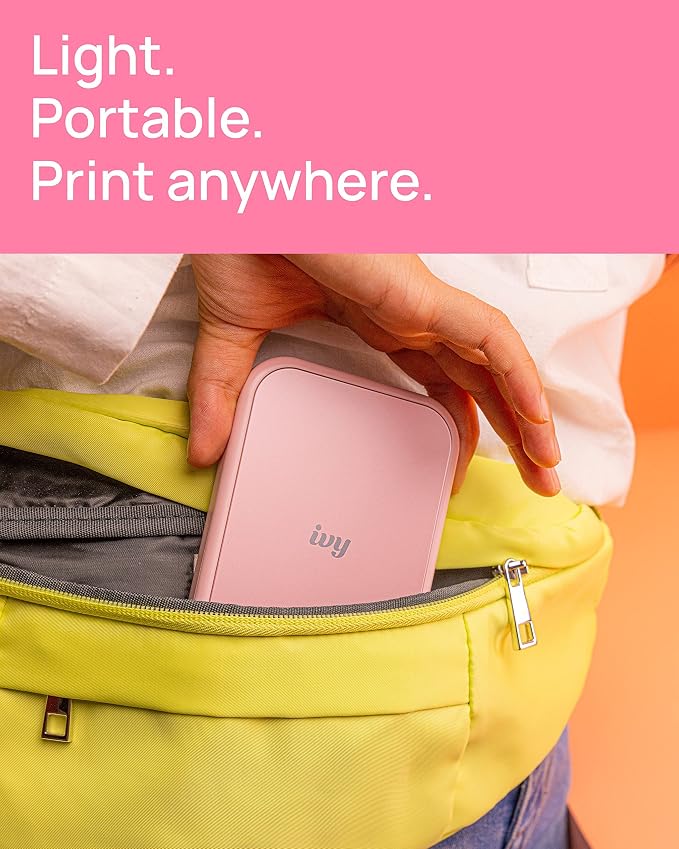
Lightweight and compact, the Canon Ivy 2 Mini Photo Printer is perfect for on-the-go printing, allowing users to capture and share memories effortlessly wherever they are.
Sticky-Back Prints
The printer produces unique sticky-back prints, enabling users to easily decorate their personal items, scrapbooks, or journals, adding a creative touch to their projects.
Wireless Compatibility
Easily print photos directly from compatible iOS and Android devices without the hassle of wires, ensuring a seamless user experience and instant memory sharing with friends and family.
Product Details
- Print and customize your photos directly from your smartphone devices via the Canon Mini Print App.(1)
- NO INK NEEDED! The IVY 2 Mini Photo Printer uses ZINK (Zero Ink) technology, which features colorful dye-based crystals embedded inside the paper.
- Place your photos anywhere, thanks to a PEEL & STICK backing that adheres to your favorite surfaces.
- PRINT QUALITY IMPROVED in the IVY 2 Mini Photo Printer(optimized skin tone colors, improved photo contrast, optimized photo sharpness)
- BETTER CONNECTIVITY for mobile printing using compatible smartphone devices with Bluetooth 5.0 technology
| Printer Type | Zink Technology |
| Other Special Features of the Product | Portable |
| Printer Output Type | Color |
| Item Weight | 0.55 Pounds (250 grams) |
| Item Dimensions D x W x H | 4.69"D x 0.79"W x 3.29"H (11.9 x 2 x 8.4 cm) |
| Controller Type | Android, iOS |
| Print media | Glossy photo paper |
| Scanner Type | Photo |
| Maximum Copy Speed Black and White | 50 ppm |
| Compatible Devices | Smartphones |
| Ink Color | Cyan, Magenta, Yellow |
| Additional Printer Functions | Print Only |
| Control Method | App |
| Processor Count | 1 |
| Resolution | 600 x 600 |
| Maximum Media Size | 3 x 5 inch (7.6 cm) |
| Maximum Sheet Capacity | 10 |
| Paper Size | 2x3 |
| Output sheet capacity | 20 |
| Printer Connectivity Type | Bluetooth |
| Hardware Interface | Bluetooth, USB |
| Total USB 2.0 Ports | 1 |
| Total Usb Ports | 1 |
| Dual-sided printing | No |
| Duplex | Simplex |
| Brand | Canon |
| Model Name | Ivy 2 |
| Model Number | 5452C017 |
| Built-In Media | Canon IVY 2 Mini Photo Printer ZINKTM Photo Paper Pack (10 Sheets & 1 SMART SHEETTM) USB Charging Cable (USB A to USB C) |
| Model Series | Ivy |
| Specific Uses For Product | Home |
| UPC | 013803347814 |
| Manufacturer | Canon |
| Item Type Name | Imaging Unit |
| Unit Count | 1 Count |
| Color Pages per Minute | 0.01 |
| B&W Pages per Minute | 0.01 |
| Color | Pink |
| Maximum print Resolution Color | 512 Dots Per Inch (1300.5 cm) |
| Maximum Print Resolution Black and White | 512 Dots Per Inch (1300.5 cm) |
| Power Consumption | 60 Watts |
| Wattage | 60 watts |
| Maximum Copy Resolution Color | 313 x 512 dpi |
| Maximum Copy Resolution Black and White | 313 x 512 dpi |
| Connectivity Technology | Bluetooth |
| Printing Technology | Zink Technology |
| Special Feature | Portable |
| Printer Output | Color |
| Maximum Print Speed (Color) | 0.01 |
| Max Printspeed Monochrome | 0.01 |
What's in the box
Canon IVY 2 Mini Photo Printer ZINKTM Photo Paper Pack (10 Sheets & 1 SMART SHEETTM) USB Charging Cable (USB A to USB C)
Who Should Buy?

-
Creative Crafters
Ideal for scrapbookers or DIY enthusiasts wanting to easily integrate photos into their projects with sticky-back prints.
-
On-the-Go Users
Perfect for travelers and event-goers who appreciate the ability to print photos instantly from their mobile devices.
-
Social Media Lovers
Great for influencers or social media users who want to create tangible keepsakes from their digital memories effortlessly.

-
Professional Photographers
Not suitable for professional work as print quality and size may not meet industry standards for high-quality prints.
-
Large Volume Printing
Users needing to print large quantities quickly may find this mini printer too slow and limited in print size.
-
High-Resolution Demands
Individuals who require high-resolution images for detailed viewing may be disappointed with the standard output quality.
Product Description
Have any Query? Chat with us
Customer Questions & Answers
-
Question:
What devices are compatible with the Canon Ivy 2 Mini Photo Printer?
Answer: The Canon Ivy 2 Mini Photo Printer is designed to work seamlessly with both iOS and Android devices. This compatibility allows users to print directly from their smartphones or tablets via Bluetooth, making it extremely convenient for capturing and preserving memories on the go. Whether you're an iPhone user or an Android enthusiast, you can easily connect your device to the printer using the Canon Mini Print app to customize and print your photos. This feature is particularly handy for social gatherings, allowing you to print and share sticky-back prints instantly. -
Question:
What is the size of the prints from the Canon Ivy 2 Mini Photo Printer?
Answer: The Canon Ivy 2 Mini Photo Printer creates 2x3-inch prints, which are compact and perfect for various uses. These small prints are great for scrapbooking, decorating your phone case, or adding a personal touch to gifts. Additionally, they feature a sticky-back, making it easy to stick your photos to surfaces like laptops, walls, or journals. This size is ideal for carrying in your bag, allowing you to print and share memories without the bulk of larger prints. -
Question:
Can I edit my photos before printing with the Canon Ivy 2?
Answer: Yes, you can edit your photos before printing with the Canon Ivy 2 Mini Photo Printer using the Canon Mini Print app. The app offers a variety of editing tools, including filters, frames, and stickers, allowing you to personalize your images to suit your style. This feature lets you create unique gifts or keepsakes by customizing each print. Whether you're preparing for a themed party or just want to personalize your photo memories, the app gives you the creative control you need. -
Question:
What type of paper does the Canon Ivy 2 Mini Photo Printer use?
Answer: The Canon Ivy 2 Mini Photo Printer uses ZINK (Zero Ink) sticky-back photo paper. This innovative paper eliminates the need for ink cartridges, as the colors are embedded in the paper itself. The advantage of using ZINK paper is that it allows for vibrant, high-quality prints while keeping the printing process simple and mess-free. Ideal for quick prints at parties, events, or personal projects, ZINK photo paper ensures that your prints come out bright and ready to stick. -
Question:
How long does it take to print a photo with Canon Ivy 2?
Answer: Printing a photo with the Canon Ivy 2 Mini Photo Printer typically takes about 50 seconds. This quick print time makes it an excellent choice for spontaneous moments and gatherings where you want to capture and share memories instantly. Imagine being at a party and being able to print fun photos to share with friends right away! The fast printing speed ensures that you don't miss out on the joy of that special moment. -
Question:
What makes the Canon Ivy 2 Mini Photo Printer portable?
Answer: The Canon Ivy 2 Mini Photo Printer is designed to be ultra-portable, weighing less than a pound and fitting comfortably in your hand or bag. Its compact size and lightweight design make it perfect for outings, trips, or events. You can easily take it along to parties, vacations, or even casual meet-ups with friends. The convenience of printing on-the-spot means you're able to capture and share experiences effortlessly, making it an ideal companion for anyone who loves photography. -
Question:
Is it possible to print photos directly from social media with Canon Ivy 2?
Answer: Yes, the Canon Ivy 2 Mini Photo Printer allows you to print photos directly from social media platforms through the Canon Mini Print app. You can import images from your Instagram or Facebook accounts, giving you the freedom to print your favorite social media moments. Once imported, you can customize these images with creative filters and frames before printing. This feature lets you turn digital memories into tangible keepsakes, making your printed photos even more meaningful. -
Question:
Do the printed photos from Canon Ivy 2 fade over time?
Answer: The photos printed from the Canon Ivy 2 Mini Photo Printer are made to resist fading due to the ZINK (Zero Ink) technology used in the printing process. While all photos can be affected by exposure to sunlight and environmental conditions, ZINK prints are specifically designed to endure the test of time under normal display circumstances. For best results, it's recommended to keep your printed photos away from direct sunlight to maintain vibrant colors and quality. -
Question:
Can you use the Canon Ivy 2 Mini Photo Printer for scrapbooking?
Answer: Absolutely! The Canon Ivy 2 Mini Photo Printer is an excellent tool for scrapbooking enthusiasts. With its ability to print 2x3-inch sticky-back photos, you can effortlessly create unique layouts and designs. The easy-to-customize prints can include fun filters, text, and frames, allowing you to personalize each image before adding it to your scrapbook. This flexibility encourages creativity, making each page a special highlight of your memories. -
Question:
Where can I buy Canon Ivy 2 Mini Photo Printer, Print from Compatible iOS & Android Devices, Sticky-Back Prints, Blush Pink?
Answer: You can purchase the Canon Ivy 2 Mini Photo Printer from Ubuy in Kenya. Ubuy provides a reliable platform for buying a variety of electronic devices and accessories, ensuring that you can find this stylish blush pink model easily. Check their website for availability and make your purchase hassle-free.
Canon Portable Photo Printers 5452C017 Editorial Review


No editorial reviews found
Customer Reviews & Ratings
4219 customers ratings
-
5 Star
79%
-
4 Star
11%
-
3 Star
5%
-
2 Star
2%
-
1 Star
3%
Review this product
Share your thoughts with other customers
Product Price History
Important information
- Limitations : For products shipped internationally, please note that any manufacturer warranty may not be valid; manufacturer service options may not be available; product manuals, instructions, and safety warnings may not be in destination country languages; the products (and accompanying materials) may not be designed in accordance with destination country standards, specifications, and labeling requirements; and the products may not conform to destination country voltage and other electrical standards (requiring use of an adapter or converter if appropriate). The recipient is responsible for assuring that the product can be lawfully imported to the destination country. When ordering from Ubuy or its affiliates, the recipient is the importer of record and must comply with all laws and regulations of the destination country.
- Not all the products listed on Ubuy are for sale, as Ubuy is a global search engine. Products are subject to export/trade regulations.
KES 16645
Order now and get it around Sunday, July 05
This item is not restrict in my country.(Please click on above link if this item is not restrict in your country, So our team will review and allow.)
QTY:
Secured transaction
Ubuy works hard to protect your security and privacy. Our advanced payment security system ensures confidentiality by encrypting your information during transmission using AES (Advanced Encryption Standards) and SSL (Secure Socket Layer) protocols. Your payment details are 100% secure as we do not share your payment details with third party sellers.
Our Top Logistics Partners
Fastest cross-border delivery
Features & Benefits
- Portable printer that can fit in your pocket
- Connects to your smartphone via Bluetooth
- Choose a photo from your smartphone or social media
- Customize your photos before printing
- Add frames, stickers, filters, text, tile print, collage print, and more
- Prints from Bluetooth and social media