0 ratings


Item #:
8460192
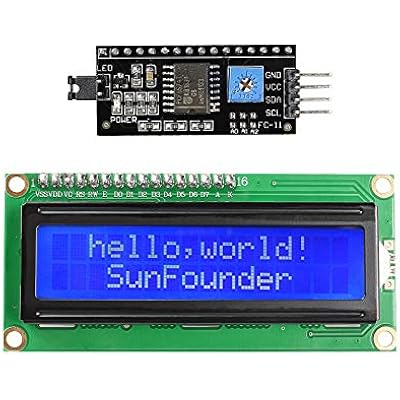
SunFounder IICI2CTWI LCD1602 Display Module Compatible with Arduino and Raspberry Pi
Item #:
8460192
KES 2493
Price Details
Excluding Shipping & Custom charges ( Shipping and custom charges will be calculated on checkout )
*All items will import from US
0 ratings
Write a review
In stock
 Imported from USA store
QTY:
Order now and get it around Saturday, June 27
Secured transaction
Ubuy works hard to protect your security and privacy. Our advanced payment security system ensures confidentiality by encrypting your information during transmission using AES (Advanced Encryption Standards) and SSL (Secure Socket Layer) protocols. Your payment details are 100% secure as we do not share your payment details with third party sellers.
Our Top Logistics Partners


SunFounder I2C LCD Module is a perfect solution for controlling your Arduino projects easily and effectively. With an intuitive interface, it requires only four I/O ports for easy operation and comes equipped with a potentiometer to adjust backlight and contrast settings.

Fast
Shipping

Free
Return*

Secure Packaging

100% Original Products

PCI DSS Compliance

ISO 27001 Certified


Note: Step Down Voltage Transformer required for using electronics products of US store (110-120). Recommended power converters Buy Now.


What Stands Out
Compatibility
Works seamlessly with both Arduino and Raspberry Pi, making it versatile for various projects, whether for hobbyists or professional applications.
Easy Integration
Designed for straightforward integration with IIC/I2C technology, reducing complexity in wiring and enhancing user-friendliness for beginners and advanced users alike.
High-Quality Display
Offers a clear and bright LCD display, ensuring excellent visibility in diverse lighting conditions, which enhances user experience and readability.
Product Details
| Item Weight | 0.3 lbs (140 grams) |
Who Should Buy?

-
Beginner Programmers
Ideal for those starting with Arduino or Raspberry Pi, simplifying programming with I2C interface.
-
DIY Electronics Projects
Perfect for hobbyists looking to create interactive devices or displays in their projects.
-
Education Purposes
Great for teaching students about interfacing LCDs and microcontroller programming in a hands-on environment.

-
Advanced Professionals
May not meet the needs of experts requiring advanced features or high-resolution displays in projects.
-
Commercial Applications
Not ideal for businesses needing robust and long-lasting display solutions for commercial products.
-
High-Performance Needs
Unsuitable for applications that demand high refresh rates or extensive graphical capabilities.
Product Description
SunFounder IICI2CTWI LCD1602 Display Module Compatible with Arduino and Raspberry Pi
Have any Query? Chat with us
Customer Questions & Answers
-
Question:
What features does the SunFounder IICI2CTWI LCD1602 display module offer?
Answer: The SunFounder IICI2CTWI LCD1602 display module features a 16x2 character LCD with backlight, I2C interface for easy connection, and compatibility with both Arduino and Raspberry Pi. Its backlight allows for visibility in various lighting conditions, while the I2C interface simplifies wiring by reducing the number of connections required. Users often utilize this module for displaying sensor readings, creating simple user interfaces, or learning about LCD functionalities in microcontroller projects. -
Question:
How do I connect the LCD1602 display module to Arduino?
Answer: To connect the LCD1602 display module to an Arduino, you need to connect the I2C pins (SDA and SCL) on the module to the corresponding SDA and SCL pins on the Arduino. Once wired correctly, you’ll need to install the appropriate libraries, such as LiquidCrystal_I2C, and use example sketches available online to initialize and display text. This setup is particularly beneficial for projects requiring a visual feedback system related to sensors or user inputs. -
Question:
Is the LCD1602 display module compatible with Raspberry Pi?
Answer: Yes, the LCD1602 display module is fully compatible with Raspberry Pi. By connecting the I2C interface, you can control the display using Python libraries like RPLCD or smbus. This compatibility makes it a popular choice for IoT projects, where data from sensors can be presented on the LCD screen, providing a user-friendly interface to interpret data in real-time. -
Question:
What is the advantage of using I2C with the LCD1602 display?
Answer: The use of I2C with the LCD1602 display provides several advantages such as reduced wiring complexity and the ability to connect multiple devices on the same bus. With just two data lines, SDA and SCL, you can simplify your project wiring significantly. This is particularly useful in environments where space and organization are critical, like in compact embedded systems or educational projects where learning I2C protocol enhances understanding of communication between devices. -
Question:
Can I change the contrast of the LCD1602 display?
Answer: Yes, you can adjust the contrast of the LCD1602 display. Typically, this is done using a potentiometer that may be included in the module. By turning the potentiometer, you can modify the voltage applied to the display, which adjusts the contrast for better visibility based on your surroundings. This feature is particularly beneficial when utilizing the display in various ambient lighting situations, ensuring that your information is always clearly visible. -
Question:
What projects can I create using the SunFounder LCD1602 display?
Answer: The SunFounder LCD1602 display is versatile and can be used in numerous projects. Common applications include temperature or humidity monitoring displays, simple text-based games, and control systems for electronic circuits. It’s an excellent tool for beginners learning to program displays or for hobbyists creating DIY projects like home automation where real-time data visualization is essential. -
Question:
Does the LCD1602 display support custom characters?
Answer: Yes, the LCD1602 display can support custom characters. You can define up to 8 custom characters using the appropriate library functions in your code. This feature allows for more personalized displays, such as displaying icons or symbols specific to your project. Whether creating a unique user interface or visual alerts, having the ability to display custom characters expands the creative possibilities of your project. -
Question:
Is there an example code available for using the LCD1602 with Arduino?
Answer: Absolutely! There are many example codes available for using the LCD1602 with Arduino. Popular libraries like LiquidCrystal_I2C come with sample sketches that demonstrate basic functionalities such as displaying text, scrolling messages, and showing sensor data. These resources make it easy for beginners to start experimenting and modifying the code to suit their specific needs and applications in interactive projects. -
Question:
What should I do if my LCD1602 display is not working?
Answer: If your LCD1602 display is not functioning, first check the wiring connections to ensure they are secure and correctly connected. Next, verify that the correct libraries are installed, and the module is correctly initialized in your code. Additionally, adjusting the contrast using the potentiometer can often resolve visibility issues. If these steps do not work, it could indicate a hardware fault, and testing the module with a different microcontroller may help diagnose the problem. -
Question:
Where can I buy the SunFounder IICI2CTWI LCD1602 display module in Kenya?
Answer: You can purchase the SunFounder IICI2CTWI LCD1602 display module on Ubuy. Ubuy offers a wide selection of electronic components, making it a convenient choice for finding compatible products for your projects. Their platform allows you to browse various options, read reviews, and ensure you have the right component for your needs, whether you’re working on hobbyist projects or educational endeavors.
SunFounder Desktop Barebones Editorial Review
The product in question is an LCD module with I2C communication capabilities. It can have multiple LCDs on one bus, using up to 8 modules. The product works well with typical voltages of 5V or 3.3V. The product comes with a blue square timmer on the serial<-->i2c board on the back allowing backlight brightness to be adjusted. The screen works without soldering. Overall, reviews of the product have been positive, with users commending the low cost and how easy the LCD is to work with. However, some users have noted that the product doesn't come with a datasheet or have brightness issues despite the brightness adjuster.
Customer Reviews & Ratings
1 customers ratings
-
5 Star
100%
-
4 Star
0%
-
3 Star
0%
-
2 Star
0%
-
1 Star
0%
Review this product
Share your thoughts with other customers
Pros
- Multiple LCDs possible
- Works with typical voltages of 5V or 3.3V
- No soldering required
- Low cost
- Easy to work with
- A useful piece of equipment
Cons
- No datasheet
Product Price History
Important information
- Limitations : For products shipped internationally, please note that any manufacturer warranty may not be valid; manufacturer service options may not be available; product manuals, instructions, and safety warnings may not be in destination country languages; the products (and accompanying materials) may not be designed in accordance with destination country standards, specifications, and labeling requirements; and the products may not conform to destination country voltage and other electrical standards (requiring use of an adapter or converter if appropriate). The recipient is responsible for assuring that the product can be lawfully imported to the destination country. When ordering from Ubuy or its affiliates, the recipient is the importer of record and must comply with all laws and regulations of the destination country.
- Not all the products listed on Ubuy are for sale, as Ubuy is a global search engine. Products are subject to export/trade regulations.
KES 2493
Order now and get it around Saturday, June 27
This item is not restrict in my country.(Please click on above link if this item is not restrict in your country, So our team will review and allow.)
QTY:
Secured transaction
Ubuy works hard to protect your security and privacy. Our advanced payment security system ensures confidentiality by encrypting your information during transmission using AES (Advanced Encryption Standards) and SSL (Secure Socket Layer) protocols. Your payment details are 100% secure as we do not share your payment details with third party sellers.
Our Top Logistics Partners
Fastest cross-border delivery
Features & Benefits
- Easy to use with only 4 I/O ports
- Comes with I2C protocol support
- Includes I2C LCD1602 library
- Equipped with a potentiometer for adjusting backlight and contrast settings
- Power supply: +5V
- Address of the module: ox27