0 ratings

Item #:
28880160
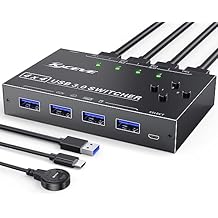
USB 3.0 Switch Selector 4 Port,MLEEDA KVM Switcher 4 Computers Sharing 4 USB Devices,USB Peripheral Switcher for Keyboard Mouse Printer Scanner,with
Item #:
28880160
KES 4639
Price Details
Excluding Shipping & Custom charges ( Shipping and custom charges will be calculated on checkout )
*All items will import from US
0 ratings
Write a review
In stock
 Imported from USA store
QTY:
This product is not Fulfilled by Ubuy and can take minimum 10 days in delivery. We might cancel the product from the order and refund you if any issue arise with the delivery of this product.
Secured transaction
Ubuy works hard to protect your security and privacy. Our advanced payment security system ensures confidentiality by encrypting your information during transmission using AES (Advanced Encryption Standards) and SSL (Secure Socket Layer) protocols. Your payment details are 100% secure as we do not share your payment details with third party sellers.
Our Top Logistics Partners


Control 2 computers with one set of mouse and keyboard, 2 computers share one monitor

Fast
Shipping

Free
Return*

Secure Packaging

100% Original Products

PCI DSS Compliance

ISO 27001 Certified


Note: Step Down Voltage Transformer required for using electronics products of US store (110-120). Recommended power converters Buy Now.


What Stands Out
Multi-Computer Sharing
Easily switch between four computers to share USB devices, enhancing efficiency for users needing seamless control in multi-device environments.
Fast Data Transfer
Supports USB 3.0 technology for high-speed data transfers, ensuring rapid file sharing between connected devices without lag or interruptions.
Convenient Remote Control
Includes a wired remote button for effortless toggling between computers, simplifying operations and minimizing physical hassle when accessing various peripherals.
Product Details
| Item Weight | 1 lbs (450 grams) |
Who Should Buy?

-
Office Workers
Ideal for users managing multiple computers while needing to switch keyboards and mice efficiently.
-
Home Office Setup
Great for individuals in a home office who want to connect various devices like printers and scanners.
-
Tech Enthusiasts
Perfect for tech users who require easy access to multiple computers for testing or development work.

-
Single Computer Users
Not suitable for individuals using one computer without the need for multiple device sharing.
-
High-Speed Gaming
May not provide the best performance for gamers needing ultra-low latency connections.
-
Occasional Users
Not practical for users who rarely need to switch between USB devices or computers.
Product Description
USB 3.0 Switch Selector 4 Port,MLEEDA KVM Switcher 4 Computers Sharing 4 USB Devices,USB Peripheral Switcher for Keyboard Mouse Printer Scanner,with Wired Remote Button and 4 USB 3.0 Cable
About This Item
Introducing our KVM Switch HDMI 2 Port Box, the ultimate solution for those looking to streamline their workstation and maximize efficiency. With this versatile switch, you can easily share one set of wired or wireless keyboard and mouse, as well as one monitor, between two computers or laptops. Our KVM switch utilizes advanced technology, including a high-precision encryption chip and gold-plated interfaces, ensuring optimal compatibility and durability.
You can trust that it will work seamlessly to control your PCs without any complications. One of the standout features of our switch is its ability to wake up your computer from hibernation using just the keyboard and mouse. This convenient functionality allows you to quickly resume work without any delays.
Additionally, our switch supports wired or wireless keyboards and mice, giving you flexibility in your setup. Thanks to its HDCP standard and adaptive EDID/HDCP decryption, our switch can adapt to complex application environments, ensuring a smooth and stable image display. It also has a built-in automatic adjustment system to further enhance image quality. Not only is our switch incredibly functional, but it is also incredibly easy to use. You won't need to install any drivers and it supports hot plug, making it a hassle-free addition to your workstation.
Plus, it is powered via USB, eliminating the need for a separate power adapter. Please note that our switch is specifically designed to support keyboards and mice, and may not recognize other USB devices such as USB cameras, printers, or U disks. If you experience any issues with your keyboard and mouse, we recommend updating the USB drivers on your computer. To ensure the best performance and support for resolutions above 1080p or 4K, we recommend using an HDMI 2.0 cable. HDMI 1.4 cables may not be able to handle higher resolutions effectively. We understand that you may have some specific compatibility concerns, and we're here to address them.
Our switch is compatible with computer DVI or Displayport interfaces, but you will need a DVI to HDMI cable and a Displayport to HDMI converter (not included in the package). Additionally, our switch supports Mac Mini, but you may need to adjust the resolution of your Mac Mini to 1920*1080p@60hz. If your device resolution exceeds our standard, we recommend downscaling the resolution for optimal performance. Experience seamless control and enhanced productivity with our KVM Switch HDMI 2 Port Box.
Upgrade your workstation today and take your efficiency to new heights. Shop now and enjoy the benefits of a clutter-free and streamlined setup.
Have any Query? Chat with us
Customer Questions & Answers
-
Question:
What is a Displayport Dual Monitor KVM Switch?
Answer: A Displayport Dual Monitor KVM Switch allows you to control two monitors and multiple computers from a single set of peripherals (keyboard and mouse). This device supports high resolutions, including 8K at 60Hz and 4K at 144Hz, ensuring a smooth visual experience whether you’re working or gaming. It's ideal for professionals who need to switch between systems frequently without the hassle of multiple setups. -
Question:
What are the benefits of using the MLEEDA KVM Switch?
Answer: The MLEEDA KVM Switch enhances productivity by allowing seamless switching between three computers while supporting two monitors. The four USB 3.0 ports enable fast connections for additional devices like printers or external drives. This functionality is particularly beneficial for gamers or designers who require robust performance across multiple systems without sacrificing display quality. -
Question:
Can I use the KVM switch with different operating systems?
Answer: Yes, the MLEEDA KVM Switch is compatible with various operating systems including Windows, macOS, and Linux. This flexibility allows you to integrate different computers into your workspace seamlessly. Users who work with diverse platforms often find this feature particularly valuable as it supports a more unified workflow. -
Question:
How do I connect my devices to the KVM switch?
Answer: Connecting your devices to the MLEEDA KVM Switch is straightforward. You’ll connect your computers to the HDMI or DisplayPort inputs, and then attach your monitors and USB peripherals to the respective ports. This setup allows quick toggling between devices, making it straightforward for users who need to access different systems rapidly throughout their workday. -
Question:
Does the KVM Switch support audio output?
Answer: Yes, the MLEEDA KVM Switch supports audio output alongside video, providing a full multimedia experience. This means you won’t need additional audio cables or setups, making your workspace more organized. It's perfect for those who engage in activities that require sound, like streaming, gaming, or video conferencing, as it simplifies your audio management. -
Question:
What resolutions does the MLEEDA KVM Switch support?
Answer: The MLEEDA KVM Switch supports impressive resolutions, up to 8K at 60Hz and 4K at 144Hz. Such high-definition video output is ideal for gamers and graphics professionals who need sharp images and fluid motion. This feature ensures that you can enjoy your multimedia experiences without compromising on quality, enhancing your overall usage experience. -
Question:
Can this KVM switch be used for gaming?
Answer: Absolutely. The high refresh rates and resolution support of the MLEEDA KVM Switch make it excellent for gaming. Gamers can enjoy their favorite titles on dual monitors without lag or distortion. This switch allows seamless transitions between gaming consoles or PCs, providing an enhanced gaming setup that maximizes performance and responsiveness. -
Question:
What types of connectivity does the KVM switch offer?
Answer: The MLEEDA KVM Switch offers a combination of DisplayPort and USB connections, allowing for a broad range of devices to be connected simultaneously. Such versatility ensures that you can connect everything from monitors and keyboard/mouse setups to external drives. This is especially useful for content creators who rely on multiple peripherals for their projects. -
Question:
How does the switch handle multiple monitors?
Answer: The MLEEDA KVM Switch can efficiently manage dual monitors by duplicating or extending displays depending on your setup preference. This capability is ideal for users who require extensive screen real estate for multitasking or for immersive gaming experiences. You can easily switch between different dual monitor setups, catering to varied tasks or preferences. -
Question:
Where can I buy the Displayport Dual Monitor KVM Switch?
Answer: You can buy the Displayport Dual Monitor KVM Switch from Ubuy, which offers a wide range of tech products including this model. Ubuy provides convenient options for browsing and purchasing, making it easy to find what you need. With a straightforward user interface and quick access to product information, Ubuy is a reliable platform for your tech shopping.
MLEEDA KVM Switches Editorial Review
The KVM Switch HDMI 2 Port Box provides the ability to share one set of wired or wireless keyboard and mouse and one monitor between two computers. It supports UHD 4K@30Hz resolution and is compatible with various devices such as laptops, PCs, PS4, Xbox, and HDTV. However, customer reception has been mixed. Some users have experienced issues with screen flickering, random screen blackouts, and unstable performance. The EDID feature also doesn't work reliably. On the positive side, the USB functionality works well with wireless devices and hubs. Overall, the product has received mixed reviews due to its unstable performance and lack of troubleshooting options in the manual.
Customer Reviews & Ratings
1 customers ratings
-
5 Star
100%
-
4 Star
0%
-
3 Star
0%
-
2 Star
0%
-
1 Star
0%
Review this product
Share your thoughts with other customers
Pros
- Allows sharing of keyboard, mouse, and monitor between two computers
- Supports UHD 4K@30Hz resolution
- USB functionality works well with wireless devices and hubs
Cons
- Screen flickering and random blackouts
Product Price History
Important information
- Limitations : For products shipped internationally, please note that any manufacturer warranty may not be valid; manufacturer service options may not be available; product manuals, instructions, and safety warnings may not be in destination country languages; the products (and accompanying materials) may not be designed in accordance with destination country standards, specifications, and labeling requirements; and the products may not conform to destination country voltage and other electrical standards (requiring use of an adapter or converter if appropriate). The recipient is responsible for assuring that the product can be lawfully imported to the destination country. When ordering from Ubuy or its affiliates, the recipient is the importer of record and must comply with all laws and regulations of the destination country.
- Not all the products listed on Ubuy are for sale, as Ubuy is a global search engine. Products are subject to export/trade regulations.
KES 4639
This product is not Fulfilled by Ubuy and can take minimum 10 days in delivery. We might cancel the product from the order and refund you if any issue arise with the delivery of this product.
This item is not restrict in my country.(Please click on above link if this item is not restrict in your country, So our team will review and allow.)
QTY:
Secured transaction
Ubuy works hard to protect your security and privacy. Our advanced payment security system ensures confidentiality by encrypting your information during transmission using AES (Advanced Encryption Standards) and SSL (Secure Socket Layer) protocols. Your payment details are 100% secure as we do not share your payment details with third party sellers.
Our Top Logistics Partners
Fastest cross-border delivery
Features & Benefits
- Supports wired or wireless keyboard and mouse
- HDMI 2.0 cable required for 1080p above or 4k resolution
- No need to install the driver, support hot plug
- Compatible with Windows, Mac OS, Linux, and Chrome OS
- Supports 4K@30Hz(YUV 4:4:4) chroma sampling and 3D
- Can wake up computer from hibernation using the keyboard and mouse