- Home Page /
- Electronics /
- Computer Accessories /
- Computer Accessories & Peripherals /
- Input Devices /
- Graphics Tablets /
- UGEE 11.9inch Anti-Glare Drawing Tablet, U120...
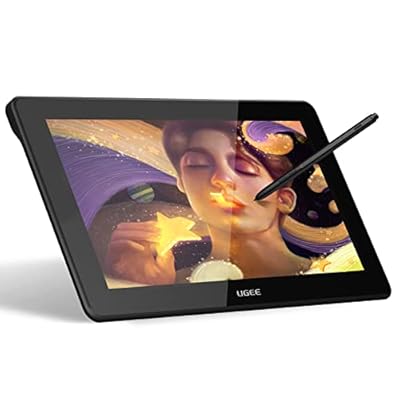
UGEE 11.9inch Anti-Glare Drawing Tablet, U1200 Model with 8192 Levels Battery-free Stylus, 1920 x 1080 LCD Screen, Compatible with MAC OS, Windows,
Ubuy works hard to protect your security and privacy. Our advanced payment security system ensures confidentiality by encrypting your information during transmission using AES (Advanced Encryption Standards) and SSL (Secure Socket Layer) protocols. Your payment details are 100% secure as we do not share your payment details with third party sellers.
Fast
Shipping
Free
Return*
Secure Packaging
100% Original Products
PCI DSS Compliance
ISO 27001 Certified

What Stands Out
Product Details
- Upgraded M708 Drawing Tablet compatible with Chromebook Windows 10 / 8 / 7 and Mac OS 10.10 or above
- Offers 8192 levels of pressure sensitivity and supports up to 60 degrees of tilt brush effect
- Large 10 x 6 inch drawing space with papery texture surface for natural sketching and painting experience
- 8 customizable express keys for drawing with shortcuts for 8 drawing softwares
- Battery-free stylus supports mouse function, pen, and eraser simultaneously
- Enhanced v3 version provides faster response and improved productivity during drawing
| Brand | UGEE |
| Model Name | U1200 |
| Built-In Media | PH12 battery-free stylus (with eraser), USB-C cable |
| Target Audience | Teacher |
| Model Number | UGEE U1200 |
| Manufacturer | UGEE |
| Unit Count | 1.0 Count |
| Connectivity Technology | USB |
| Pressure Sensitivity | 8192 Levels |
| Operating System | Linux, MAC OS 10.10 or above, Windows 10, Windows 11, Windows 7, Windows 8 |
| Additional Features | Anti-Glare Glass |
| Specific Uses For Product | Drawing |
| Compatible Devices | Windows 7, 8, 10, 11, Mac OS X 10.10 or later, Chrome OS 88 or later, Android (USB3.1 DP1.2), Linux |
| Display Type | LCD |
| Native Resolution | 1920x1080 |
| Screen Size | 11.9 Inches (30.2 cm) |
| Item Weight | 0.78 Kilograms |
| Item Dimensions L x W | 8.21"L x 12.75"W (20.9 cm) |
| Active Surface Area | 3909.992 square mm |
| Special Feature | Anti-Glare Glass |
Dangerous Goods
To avoid the delay in customs clearance process for Dangerous Goods, the shipment shall be opened at our warehouse facility to check the severity of hazardous components. Please see the list of Dangerous goods here.
Who Should Buy?
-
Digital Artists
Ideal for artists seeking a portable tablet with high sensitivity and precision for digital illustrations.
-
Students and Educators
Perfect for students needing a device for taking notes, drawing diagrams, and engaging in interactive learning.
-
Graphic Designers
Great for graphic designers who require a reliable tool for creating detailed designs with color accuracy.
-
Heavy Gamers
Not suitable for gamers looking for high refresh rates and extensive gaming features on a tablet.
Product Description
UGEE 11.9inch Anti-Glare Drawing Tablet, U1200 Model with 8192 Levels Battery-free Stylus, 1920 x 1080 LCD Screen, Compatible with MAC OS, Windows, Linux, Android Phone
Customer Questions & Answers
-
Question:
What features does the UGEE 11.9inch Anti-Glare Drawing Tablet offer?
Answer: The UGEE 11.9inch Drawing Tablet boasts an impressive 1920 x 1080 LCD screen resolution, anti-glare properties, and 8192 levels of pressure sensitivity with a battery-free stylus. This makes it ideal for artists and designers who require precision and comfort while drawing. The anti-glare feature helps reduce reflections, allowing for a more natural drawing experience regardless of lighting conditions. -
Question:
Is the UGEE U1200 model compatible with both Mac OS and Windows?
Answer: Yes, the UGEE U1200 model is designed to be fully compatible with both Mac OS and Windows systems, allowing versatility for users across different platforms. This means whether you're working on a MacBook or a Windows laptop, you can seamlessly connect the tablet and start creating art without worrying about software or driver issues. -
Question:
How does the battery-free stylus work?
Answer: The battery-free stylus used with the UGEE U1200 relies on electromagnetic resonance technology, meaning it doesn’t require batteries to function. This enhances the user experience by eliminating the need to charge the stylus, allowing for prolonged creative sessions without interruptions. Artists can enjoy a lightweight, responsive tool that mimics the feel of traditional drawing instruments. -
Question:
What is the best way to set up the UGEE Drawing Tablet?
Answer: To set up your UGEE Drawing Tablet, first install the provided drivers from the manufacturer’s website, ensuring compatibility with your operating system. Once installed, connect the tablet to your computer via USB and adjust the settings for pen pressure and mapping. This setup maximizes your drawing efficiency and allows for a personalized experience tailored to your creative needs. -
Question:
Can I use the UGEE 11.9inch Drawing Tablet for professional graphic design?
Answer: Absolutely! The UGEE 11.9inch Drawing Tablet is equipped with high-resolution capabilities and precise pressure sensitivity, making it suitable for professional graphic design. Designers can create intricate illustrations, animations, and digital art with accuracy, all while enjoying the fluid response of the stylus on the drawing surface, making it a go-to choice for professionals. -
Question:
What software is compatible with the UGEE Drawing Tablet?
Answer: The UGEE Drawing Tablet is compatible with a variety of graphic design software including Adobe Photoshop, Illustrator, CorelDRAW, and more. This flexibility allows users to switch between different applications seamlessly, enhancing their workflow. Whether you're manipulating graphics or drawing from scratch, the tablet provides an intuitive interface for all your artistic needs. -
Question:
Does the UGEE tablet require any special maintenance?
Answer: The UGEE Drawing Tablet requires minimal maintenance. Regular cleaning of the tablet surface with a soft cloth will help maintain the anti-glare finish and overall performance. Additionally, ensuring the stylus is free from debris will preserve its sensitivity. By taking these simple steps, you can keep your drawing tablet in top condition for all your creative projects. -
Question:
Is the tablet suitable for beginners or only for experienced artists?
Answer: The UGEE 11.9inch Drawing Tablet is suitable for both beginners and experienced artists. Its user-friendly interface and versatile features make it accessible to newcomers, while the advanced sensitivity and resolution cater to the needs of seasoned professionals. Whether you are just starting out or looking to refine your skills, this tablet adapts to your level of expertise. -
Question:
What types of art can I create with the UGEE Drawing Tablet?
Answer: With the UGEE Drawing Tablet, you can create a wide range of art, including illustrations, concept art, character design, digital painting, and photo editing. The tablet’s high pressure sensitivity allows for nuanced strokes, making it perfect for intricate detailing. It empowers both hobbyists and professionals alike to explore various artistic styles and techniques. -
Question:
Where can I buy the UGEE 11.9inch Anti-Glare Drawing Tablet?
Answer: You can purchase the UGEE 11.9inch Anti-Glare Drawing Tablet at Ubuy in Kenya. Ubuy offers a wide range of electronics, ensuring you receive a quality product along with excellent customer service. Check out their website for availability and any ongoing promotions that may enhance your purchasing experience.
UGEE Graphics Tablets UGEE U1200 Editorial Review
The Ugee U1200 tablet with screen is generally well-received by customers, with some users having issues with compatibility and set-up. The device is compatible with Android phones supporting USB3.0 & DP1.2, Windows 10 desktops, and Chromebooks with Chrome OS 88.0.4324.109 and newer versions. It has low power consumption, works with popular drawing software, and can be left on for hours without issue. Users recommend using a USB to HDMI adapter if the computer lacks an HDMI port. One customer returned the device due to difficulty with set-up, while another bought a used computer to make it work. However, other users like the tablet's functionality and ease of use, with good stylus accuracy and bundled accessories including spare nibs, stylus, gloves, and a wipe cloth. The device can connect to devices via type C technology, and the monitor tablet bundle is lightweight and has rubber pads to prevent slippage. The tablet has a slight incline for ease of use, and drivers can be downloaded from the Ugee site.
Customer Reviews & Ratings
-
5 Star
100%
-
4 Star
0%
-
3 Star
0%
-
2 Star
0%
-
1 Star
0%
Review this product
Share your thoughts with other customers
Pros
- Low power consumption
- Works with popular drawing software
- Comes with accessories (spare nibs, stylus, gloves, and a wipe cloth)
- Good stylus accuracy
- Lightweight
- Rubber pads prevent slippage
- Slight incline for ease of use
- Drivers can be downloaded from Ugee site
Cons
- Compatibility issues may arise with some devices
Platform Trust & Buyer Confidence
“The product received very good packaging & safe…Thank You”
“Accurate delivery timing given”
“Not madly expensive like I thought, and much quicker than promised.”
“Never dealt with Ubuy before, but everything worked out great. Seamless cross border purchasing and shipping. Thanks!”
“The process was smooth, with clear communication and timelines. This was my 1st purchase and I am really impressed. I will definitely be coming back.”
Important information
- Limitations : For products shipped internationally, please note that any manufacturer warranty may not be valid; manufacturer service options may not be available; product manuals, instructions, and safety warnings may not be in destination country languages; the products (and accompanying materials) may not be designed in accordance with destination country standards, specifications, and labeling requirements; and the products may not conform to destination country voltage and other electrical standards (requiring use of an adapter or converter if appropriate). The recipient is responsible for assuring that the product can be lawfully imported to the destination country. When ordering from Ubuy or its affiliates, the recipient is the importer of record and must comply with all laws and regulations of the destination country.
- Not all the products listed on Ubuy are for sale, as Ubuy is a global search engine. Products are subject to export/trade regulations.
Currently unavailable.
We don't know when or if this item will be back in stock.
This item is not restrict in my country.(Please click on above link if this item is not restrict in your country, So our team will review and allow.)
PCI DSS compliant and ISO 27001:2022 certified, with encrypted payments and full buyer protection on every order.
Ubuy Assurance
Experience worry-free shopping with 100% original products, PCI DSS-compliant payment security, ISO 27001-certified data protection, the fastest cross-border delivery, free returns *, and secure packaging on every order.


