- Home Page /
- Electronics /
- Computer Accessories /
- Computer Accessories & Peripherals /
- Computer Cable Adapters /
- USB-to-VGA Adapters /
- NGFF M.2 to USB Converter, M.2 to PCI-e Conne...
0 ratings

Item #:
52233262
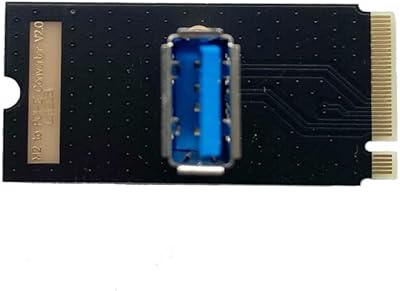
NGFF M.2 to USB Converter, M.2 to PCI-e Connector Molex Riser Adapter for GPU Black
Item #:
52233262
KES 3744
Price Details
Excluding Shipping & Custom charges ( Shipping and custom charges will be calculated on checkout )
*All items will import from US
0 ratings
Write a review
In stock
 Imported from USA store
QTY:
Order now and get it around Saturday, June 27
Secured transaction
Ubuy works hard to protect your security and privacy. Our advanced payment security system ensures confidentiality by encrypting your information during transmission using AES (Advanced Encryption Standards) and SSL (Secure Socket Layer) protocols. Your payment details are 100% secure as we do not share your payment details with third party sellers.
Our Top Logistics Partners


Easy installation & no driver required, supports all operating systems.

Fast
Shipping

Free
Return*

Secure Packaging

100% Original Products

PCI DSS Compliance

ISO 27001 Certified


Note: Step Down Voltage Transformer required for using electronics products of US store (110-120). Recommended power converters Buy Now.


What Stands Out
Versatile Connectivity
This converter allows seamless connection of M.2 NVMe SSDs to USB ports, enhancing compatibility with various devices, satisfying users seeking both performance and flexibility.
Robust Design
Constructed from high-quality materials for durability, this adapter ensures stable performance for demanding applications, making it a reliable choice for gamers and professionals.
Enhanced Performance
Supports high-speed data transfer rates, significantly reducing loading times and improving overall system responsiveness, ideal for users upgrading their systems for enhanced productivity or gaming experiences.
Product Details
| Item Weight | 0.5 lbs (230 grams) |
Who Should Buy?

-
Gaming Enthusiasts
Perfect for gamers looking to enhance their GPU performance through a reliable M.2 to PCI-e connection.
-
PC Builders
Ideal for DIY PC builders needing a versatile adapter to expand hardware compatibility in custom setups.
-
Data Recovery Technicians
Useful for technicians who need quick access to NVMe SSDs for data recovery purposes via USB.

-
Casual Users
Not ideal for general users who do not require advanced GPU configurations or M.2 connections.
-
Older Systems
Outdated computers may lack compatibility with M.2 interfaces and thus find this product unsuitable.
-
Non-Gaming Graphics
Users focused on non-gaming applications may not benefit from the advantages provided by this adapter.
Product Description
NGFF M.2 to USB Converter, M.2 to PCI-e Connector Molex Riser Adapter for GPU Black
Have any Query? Chat with us
Customer Questions & Answers
-
Question:
What is an NGFF M.2 to USB Converter used for?
Answer: An NGFF M.2 to USB Converter allows users to connect M.2 solid-state drives (SSDs) to USB ports, enabling the use of high-speed storage in various devices. This is particularly beneficial for users who want to use NVMe drives in external setups or those looking to transfer data rapidly. For instance, gamers can use this adapter to boost their gaming storage external speed, enhancing performance during gameplay. -
Question:
Can the M.2 to PCI-e Connector Molex Riser Adapter be used for mining?
Answer: Yes, the M.2 to PCI-e Connector Molex Riser Adapter is commonly used in cryptocurrency mining setups. It enables the connection of GPUs for mining operations, allowing for a compact arrangement of hardware, which is especially helpful for those looking to optimize space and improve airflow. Many users utilize this adapter to assemble effective mining rigs that enhance their return on investment. -
Question:
Is the M.2 to USB Converter compatible with all M.2 SSDs?
Answer: The M.2 to USB Converter is primarily designed to work with NVMe and SATA M.2 SSDs that conform to the NGFF (Next Generation Form Factor) standard. However, it is essential to ensure that the SSD you are using supports USB connectivity. This versatility makes it an ideal choice for tech enthusiasts looking to repurpose SSDs across different systems or devices. -
Question:
How do I install the M.2 to PCI-e Connector Molex Riser Adapter?
Answer: Installing the M.2 to PCI-e Connector Molex Riser Adapter involves inserting your M.2 SSD into the riser card, then connecting the riser to your motherboard's PCIe slot and connecting the Molex power supply. This setup allows for optimal power delivery and stable performance for your GPU or SSD. It's a straightforward process that empowers DIY builders to achieve customized computer performance. -
Question:
What are the benefits of using an M.2 to USB Converter?
Answer: Using an M.2 to USB Converter maximizes the potential of existing SSDs by enabling their use in devices lacking M.2 slots. This is particularly useful for individuals seeking to repurpose outdated SSDs or create portable storage solutions. The high-speed transfer speeds of M.2 drives translate into faster data transfers, making this converter ideal for tasks like media editing or large file backups. -
Question:
Can I use the M.2 to PCI-e Connector with a motherboard that doesn't support M.2?
Answer: Yes, you can use the M.2 to PCI-e Connector with a motherboard that doesn't natively support M.2 drives by using the adapter. This allows the integration of newer SSDs into older systems, significantly boosting read/write performance. Users looking to upgrade their PCs but who are constrained by older hardware will find this solution particularly advantageous. -
Question:
Is the installation of the NGFF M.2 to USB Converter straightforward?
Answer: Yes, installation of the NGFF M.2 to USB Converter is straightforward. Simply insert your M.2 SSD into the converter, then connect it to a USB port on your computer. This setup offers the flexibility to effortlessly upgrade laptops or desktops, allowing users to expand their storage without significant technical skills. It's an ideal solution for casual users needing more storage on the go. -
Question:
What is the maximum data transfer speed of the M.2 to USB Converter?
Answer: The maximum data transfer speed of an M.2 to USB Converter typically depends on the type of SSD it is paired with and the USB version supported. NVMe drives can achieve speeds of up to 10 Gbps with USB 3.1 or higher. This makes the converter perfect for users needing fast access to large files, such as video editors or gamers who frequently load substantial data. -
Question:
Where can I buy an NGFF M.2 to USB Converter in Kenya?
Answer: You can buy the NGFF M.2 to USB Converter, M.2 to PCI-e Connector Molex Riser Adapter for GPU Black from Ubuy in Kenya. Ubuy provides a user-friendly platform with various products tailored to your needs, ensuring you find exactly what you're looking for. Plus, shopping at Ubuy often means access to exclusive offers and a seamless purchasing experience. -
Question:
Are there any limitations to using an M.2 to PCI-e Connector?
Answer: Yes, while the M.2 to PCI-e Connector is highly versatile, it may have limitations such as compatibility with specific motherboards or a maximum power limit set by your power supply unit. Additionally, not all M.2 SSDs may work optimally with certain adapters. Users should check compatibility with their motherboard and usage requirements to ensure they achieve the best performance from their hardware.
Thsion USB-to-VGA Adapters Editorial Review
The Thsion NGFF M.2 to USB PCIe Riser Adapter is a great tool for crypto miners who need to plug in additional GPUs to their motherboard. It is not a standard USB port, but rather converts an M.2 port to a USB connector, passing the same PCI-E signal through it. It is easy to use and plug-and-play, with no issues reported by customers who have used it. To use it, simply connect it to the motherboard and change the M.2 device to Pcie in the BIOS. However, some customers have reported having difficulty using this adapter, with one customer stating that it did not work for them. Additionally, some customers have reported poor manufacturing, with the need to shave off material to fit it in the M.2 slot. This may be a deal-breaker for some customers. Overall, the Thsion NGFF M.2 to USB PCIe Riser Adapter is a useful tool for crypto miners who need to add more GPUs to their motherboard. Its ease of use and plug-and-play functionality make it a good choice for those who need an additional PCIe slot.
Customer Reviews & Ratings
1 customers ratings
-
5 Star
0%
-
4 Star
100%
-
3 Star
0%
-
2 Star
0%
-
1 Star
0%
Review this product
Share your thoughts with other customers
Pros
- Easy to use and plug-and-play
- Allows for the addition of extra GPUs to the motherboard
- Inexpensive
Cons
- Poor manufacturing, with the need to shave off material to fit in the M.2 slot
Product Price History
Important information
- Limitations : For products shipped internationally, please note that any manufacturer warranty may not be valid; manufacturer service options may not be available; product manuals, instructions, and safety warnings may not be in destination country languages; the products (and accompanying materials) may not be designed in accordance with destination country standards, specifications, and labeling requirements; and the products may not conform to destination country voltage and other electrical standards (requiring use of an adapter or converter if appropriate). The recipient is responsible for assuring that the product can be lawfully imported to the destination country. When ordering from Ubuy or its affiliates, the recipient is the importer of record and must comply with all laws and regulations of the destination country.
- Not all the products listed on Ubuy are for sale, as Ubuy is a global search engine. Products are subject to export/trade regulations.
KES 3744
Order now and get it around Saturday, June 27
This item is not restrict in my country.(Please click on above link if this item is not restrict in your country, So our team will review and allow.)
QTY:
Secured transaction
Ubuy works hard to protect your security and privacy. Our advanced payment security system ensures confidentiality by encrypting your information during transmission using AES (Advanced Encryption Standards) and SSL (Secure Socket Layer) protocols. Your payment details are 100% secure as we do not share your payment details with third party sellers.
Our Top Logistics Partners
Fastest cross-border delivery
Features & Benefits
- Convert M.2 M Key NGFF to PCI-e and USB interface.
- Compatible with Windows, LINUX, and MAC with no drivers needed.
- Easily install standard PCI-e 4x cards in an M.2 slot.
- No power supply required for operation.
- Supports 2260/2280 type M.2 SSD module slots.
- Ideal for desktop and laptop upgrades.