- Home Page /
- Electronics /
- Computer Accessories /
- Computer Accessories & Peripherals /
- Input Devices /
- Digital Pens /
- Stylus Pen, Black, for Microsoft Surface | 40...
0 ratings



Item #:
241591735
Stylus Pen, Black, for Microsoft Surface | 4096 Pressure, Palm Rejection, Magnetic Attach, USB Fast Charge, MPP 2.0
Item #:
241591735
KES 4439
Price Details
Excluding Shipping & Custom charges ( Shipping and custom charges will be calculated on checkout )
*All items will import from US
In stock
 Imported from USA store
QTY:
Order now and get it around Sunday, September 06
Secured transaction
Ubuy works hard to protect your security and privacy. Our advanced payment security system ensures confidentiality by encrypting your information during transmission using AES (Advanced Encryption Standards) and SSL (Secure Socket Layer) protocols. Your payment details are 100% secure as we do not share your payment details with third party sellers.
Our Top Logistics Partners


Experience drawing and writing like never before with our high-sensitivity, no latency stylus pen, designed for your ultimate comfort and precision.

Fast
Shipping

Free
Return*

Secure Packaging

100% Original Products

PCI DSS Compliance

ISO 27001 Certified




Note: Step Down Voltage Transformer required for using electronics products of US store (110-120). Recommended power converters Buy Now.


Product Details
- 【Support Tilt Sensitivity & 4096 Pressure Sensitivity】Support MPP2.0 protocol helps allows you to precisely sketch and shade ,with 4096 pressure sensitivities that respond to the lightest touch. Tilting the stylus at an angle also allows you to shade like you would with a real pencil. Note: Tilt sensitivity compatibility depends on the application and pen brush.
- 【Palm Rejection Function & Magnetic Attach】This stylus pen has a palm rejection function that allows you to rest your palm comfortably on the screen while you write or draw without interfering with stylus use. Magnetic adsorption design,You can place gently carry the pen on the tablet LEFT side of , it absorbs immediately(Only those compatible with magnetic suction have effect).
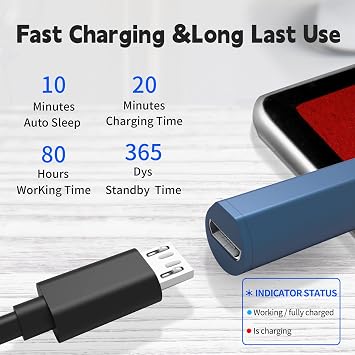
- 【Ultra fast Charging and Intelligent Power Management】 Avoid the trouble and waste of disposable batteries. It can be used for about 80 hours after being charged for 20 minutes. With the Smart power management design, it will switch to power-saving mode after 10-minutes of idle. Pressing any button can wake you up from the power-saving mode.
- 【Compatible Models】This stylus pen is compatible with Microsoft Surface Pro X, Surface Pro 12/11/10/9/8/7/6/5/4/3, Surface Book 4/3/2/1, Surface Go4/3/2/1, Surface Studio 2/1, Surface Laptop 7/6/5/4/3/2/1, and Surface 3 tablets.
- 【Compatible Models】HP Envy 17-aexxX HP Envyx36015-bo0xx HPEnvy x36015-bq0xx, HP Pavition x36011m-ad0xx HP Pavilion x36014m-ba0xx HP Pavilion x36015-brOxx ,HP Spectre x2 12-c0xx HP Spectre x36013-ac0xx HP Spectre x360 13-ae000 HP Spectre x36015-bl0xx.ASUS Transformer Mini(T102HA)ASUS Transformer 3 Pro(T303UA)ASUS Transformer 3(T305CA)ASUS Transformer Pro(T304UA)ASUS ZenBook Flip S(UX37OUA)ASUS vivobook Flip 12 R211NAASUS Vivobook Flip 14R11NAASUS Rog zephyrus duo15 ASUS GX550LASUS FS4100.
| Number of Batteries | 1 Lithium Polymer batteries required. |
| Battery Average Life Standby | 80 hours |
| Compatible Devices | Laptop, Tablet |
| Charging Time | 1 hours |
| Battery Description | Lithium-Ion Polymer |
| Pressure Sensitivity | 4096 levels |
| Compatible Tablet Computer Models | Microsoft Surface 3, Microsoft Surface Go 3, Microsoft Surface Pro 9, Microsoft Surface Pro X |
| Color | Blue |
| Enclosure Material | Aluminum |
| Item Weight | 17 g |
| Item Dimensions | 5.75 x 0.35 x 0.35 inches (14.6 x 0.9 x 0.9 cm) |
| Brand | SSS·GRGB |
| Model Number | 5 Lan |
| Number of Packs | 1 |
| Unit Count | 1 Count |
| Manufacturer | SSS·GRGB |
| Mfr Part Number | 5 Lan |
| Material | Aluminum |
| Item dimensions L x W x H | 5.75 x 0.35 x 0.35 inches (14.6 x 0.9 x 0.9 cm) |
Product Description
Have any Query? Chat with us
Customer Questions & Answers
-
Question:
What devices are compatible with the Stylus Pen for Microsoft Surface Pro?
Answer: The Stylus Pen is specifically designed for use with Microsoft Surface devices including the Surface Pro (all models), Surface Laptop, Surface Book, Surface Studio, Surface 3, Surface Go, Surface Go 2, and Surface Go 3. This compatibility ensures a seamless writing and drawing experience tailored for Windows devices. Users can leverage the 4096 pressure sensitivity feature for precise input, making it ideal for artists, students, and professionals alike. -
Question:
How does the pressure sensitivity feature enhance my experience?
Answer: The 4096 pressure sensitivity of the Stylus Pen enables nuanced control over line thickness and opacity, simulating the effect of traditional drawing tools. This feature is particularly beneficial for graphic designers and digital artists, allowing for more expressive strokes and creativity. Whether you are sketching detailed illustrations or taking notes, the varying pressure levels can significantly enhance your workflow and artistic expression. -
Question:
Can the Stylus Pen be used for note-taking and drawing apps?
Answer: Absolutely! The Stylus Pen is perfect for various applications, whether you're jotting down notes in Microsoft OneNote, creating illustrations in Adobe Fresco, or drafting designs in Sketchable. This versatility makes it an essential tool for students and professionals alike who engage in both writing and creative functions on their Surface devices. -
Question:
How does the magnetic attachment feature benefit users?
Answer: The magnetic attachment of the Stylus Pen allows you to securely store it on the side of your Surface device, ensuring that it's always within reach. This feature also prevents accidental loss or damage, making it a practical accessory for mobile usage. Users can easily grab their pen when needed, whether at home or on the go, maintaining their productivity without interruptions. -
Question:
What is the process for charging the Stylus Pen?
Answer: The Stylus Pen features a convenient USB charging system that allows for quick recharges. Simply connect it to a compatible USB port using the included cable to recharge between uses. This ensures that the pen is always ready when you need it, eliminating the hassle of replacing batteries and offering a sustainable alternative for continuous use throughout the day. -
Question:
Is there a specific writing technique I should use with the Stylus Pen?
Answer: While using the Stylus Pen, a comfortable grip and a relaxed hand position can enhance your writing or drawing experience. Different angles and varied pressure can produce diverse effects. Users are encouraged to experiment with different techniques—such as swift strokes for calligraphy or lighter touches for shading—to discover their unique style. This adaptability makes it suitable for both novices and seasoned artists. -
Question:
Can I use the Stylus Pen for gaming on Microsoft Surface devices?
Answer: Yes, the Stylus Pen can be used for certain gaming applications on Microsoft Surface devices. While it's not primarily designed for gaming, it can enhance your experience in specific games that support stylus input, particularly those focused on creative elements or design. Gamers can enjoy a more immersive and precise control when navigating games that benefit from such input methods. -
Question:
What is the weight of the Stylus Pen and how does it affect usage?
Answer: The Stylus Pen’s lightweight design ensures that it doesn't cause fatigue during extended use. Users appreciate a lighter pen as it allows for prolonged creativity, whether that’s sketching for hours or taking detailed notes in class. The balance and weight contribute to a natural feel, making it easier for users to switch between different tasks without losing comfort or control. -
Question:
How durable is the Stylus Pen for everyday use?
Answer: The Stylus Pen is crafted from high-quality materials to withstand daily wear and tear. Its robust design ensures durability, making it suitable for everyday tasks like note-taking, sketching, and gaming. Users can rest assured that they are investing in a pen that will remain functional even with frequent use, providing reliability whether at home, in the office, or on campus. -
Question:
Where can I buy the Stylus Pen for Microsoft Surface devices?
Answer: You can buy the Stylus Pen for Microsoft Surface devices at Ubuy. Ubuy typically has a variety of stylus models available and offers a user-friendly shopping experience. You can browse through the options and select the one that best suits your device and needs, ensuring that you get the right accessory for your Microsoft Surface experience.
SSS·GRGB Digital Pens 5 Lan Editorial Review


No editorial reviews found
Customer Reviews & Ratings
327 customers ratings
-
5 Star
59%
-
4 Star
17%
-
3 Star
11%
-
2 Star
3%
-
1 Star
10%
Review this product
Share your thoughts with other customers
Platform Trust & Buyer Confidence

MA
Mohammad
Verified buyer
“Excellent quality and original too,when ubuy send original things I will appreciate that ,I very satisfied thank you”
23 July 2026 · via Trustpilot
CK
Chitra
Verified buyer
“The order and delivery progress was communicated very well. Package arrived within the estimated time. Products arrived as expected in good condition.”
22-Jul-26 · via Trustpilot
K
kund
Verified buyer
“Good supply of products. Safe payment methods, and shipment worldwide! Genuine products.”
23-Jul-26 · via Trustpilot
OO
Onesi
Verified buyer
“Was my first time buying a product from Ubuy, but I found it so helpful. This is reliable. Gonna place a new order!”
22 July 2026 · via Trustpilot
SJ
SAO JOHN
Verified buyer
“Ubuy is a great online platform to buy stuff. Reliable, fast delivery time and great value for money. I've been using Ubuy online shopping platform for three years now and will continue to do so.”
23 July 2026 · via Trustpilot
Secure Checkout
Global Delivery
Easy Returns
Genuine Products
Product Price History
Important information
- Limitations : For products shipped internationally, please note that any manufacturer warranty may not be valid; manufacturer service options may not be available; product manuals, instructions, and safety warnings may not be in destination country languages; the products (and accompanying materials) may not be designed in accordance with destination country standards, specifications, and labeling requirements; and the products may not conform to destination country voltage and other electrical standards (requiring use of an adapter or converter if appropriate). The recipient is responsible for assuring that the product can be lawfully imported to the destination country. When ordering from Ubuy or its affiliates, the recipient is the importer of record and must comply with all laws and regulations of the destination country.
- Not all the products listed on Ubuy are for sale, as Ubuy is a global search engine. Products are subject to export/trade regulations.
KES 4439
Order now and get it around Sunday, September 06
This item is not restrict in my country.(Please click on above link if this item is not restrict in your country, So our team will review and allow.)
QTY:
Secured transaction
PCI DSS compliant and ISO 27001:2022 certified, with encrypted payments and full buyer protection on every order.
Our Top Logistics Partners
Fastest cross-border delivery
Features & Benefits
- High-precision 4096-level pressure sensitivity for accurate input.
- Tilt support for versatile drawing angles and effects.
- Palm rejection technology allows for comfortable hand placement.
- Durable silicone nib for long-lasting use and screen protection.
- Easy magnetic attachment for effortless storage.
- Quick charge capabilities with up to 80 hours of use on a 20-minute charge.
Ubuy Assurance
Experience worry-free shopping with 100% original products, PCI DSS-compliant payment security, ISO 27001-certified data protection, the fastest cross-border delivery, free returns *, and secure packaging on every order.