- Home Page /
- Electronics /
- Computer Accessories /
- Computer Components /
- Laptop Replacement Parts /
- TLBTEK Backlight Keyboard Replacement Compati...
0 ratings


Replacing a new laptop keyboard can address the following issues: Restore functionality of damaged or unresponsive keys, Improve typing speed and accuracy, Prevent further damage to the laptop caused by liquid spills and debris accumulation, Increase the lifespan of the laptop by maintaining its keyboard in good condition.
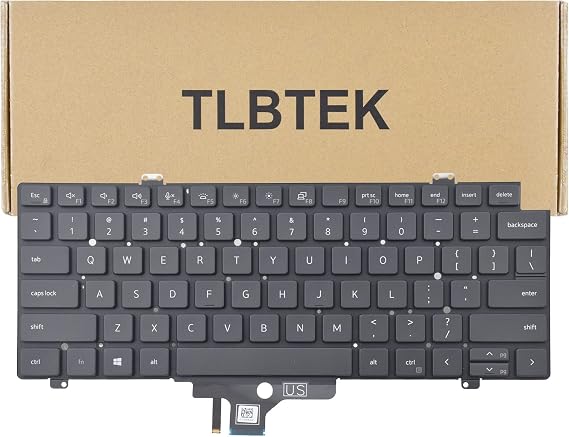
Item #:
83292343
TLBTEK Backlight Keyboard Replacement Compatible with Dell Latitude 5420 5421 5430 7420 7520 2021 Series Laptop P/N: 0PWCJY 0CVGNH PK132UG2A00
75% of respondents would recommend this to a friend
Item #:
83292343
KES 3338
Price Details
Excluding Shipping & Custom charges ( Shipping and custom charges will be calculated on checkout )
*All items will import from US
0 ratings
Write a review
In stock
 Imported from USA store
QTY:
Order now and get it around Friday, September 04
Secured transaction
Ubuy works hard to protect your security and privacy. Our advanced payment security system ensures confidentiality by encrypting your information during transmission using AES (Advanced Encryption Standards) and SSL (Secure Socket Layer) protocols. Your payment details are 100% secure as we do not share your payment details with third party sellers.
Our Top Logistics Partners


Replacing a new laptop keyboard can address the following issues: Restore functionality of damaged or unresponsive keys, Improve typing speed and accuracy, Prevent further damage to the laptop caused by liquid spills and debris accumulation, Increase the lifespan of the laptop by maintaining its keyboard in good condition.

Fast
Shipping

Free
Return*

Secure Packaging

100% Original Products

PCI DSS Compliance

ISO 27001 Certified




Note: Step Down Voltage Transformer required for using electronics products of US store (110-120). Recommended power converters Buy Now.


What Stands Out
Backlight Functionality
Offers adjustable backlit keys, enhancing visibility in low-light environments for improved typing precision and efficiency, which is perfect for night-time or dimly lit workspaces.
Perfect Compatibility
Specifically designed for Dell Latitude series laptops including models 5420 to 7520, ensuring a seamless fit and functionality, eliminating compatibility worries for users.
Easy Installation
User-friendly design allows for straightforward installation without professional tools, enabling quick and hassle-free replacement, empowering users to upgrade their laptops effortlessly.
Product Details
| Compatible Devices | Laptop |
| Connectivity Technology | Wired |
| Additional Features | Backlit |
| Keyboard Backlighting Color Support | Single Color |
| Power Source | Wired |
| Switch Type | Membrane |
| Keyboard Layout | QWERTY |
| Hand Orientation | Ambidextrous |
| Water Resistance Level | Not Water Resistant |
| Minimum Required Operating System Version | Windows 10 |
| Number of Keys | 104 |
| Number of Sections | 1 |
| Color | for dell 7420 backlight |
| Style Name | Contemporary |
| Brand | TLBTEK |
| Keyboard Description | laptop keyboard |
| Antenna Location | Office |
| Built-In Media | Keyboard |
| Model Number | 5420 5421 5430 7420 7520 2021 |
| Model Name | Compatible with Dell Latitude |
| Unit Count | 1.0 Count |
| Manufacturer | TLBTEK |
| Enclosure Material | Metal |
| Recommended Uses For Product | Office |
| Special Feature | Backlit |
| Keyboard backlighting color support | Single Color |
| Style | Contemporary |
| Material | Metal |
| Item Weight | 1 lbs (450 grams) |
Who Should Buy?

-
Frequent Typists
Ideal for users who type extensively, providing comfortable keys for long sessions without fatigue.
-
Night Workers
Great for those who work in low-light conditions, the backlighting enhances visibility and reduces strain.
-
Tech Savvy Users
Suitable for users familiar with DIY repairs, offering a straightforward installation process for keyboard replacement.

-
Non-Dell Users
Not suitable for laptops other than specified Dell models, limiting its compatibility with other brands.
Product Description
TLBTEK Backlight Keyboard Replacement Compatible with Dell Latitude 5420 5421 5430 7420 7520 2021 Series Laptop P/N: 0PWCJY 0CVGNH PK132UG2A00
Have any Query? Chat with us
Customer Questions & Answers
-
Question:
What models are compatible with the TLBTEK Backlight Keyboard Replacement?
Answer: The TLBTEK Backlight Keyboard Replacement is compatible with several Dell Latitude models, specifically the 5420, 5421, 5430, 7420, and 7520 from the 2021 series. This compatibility ensures that it can seamlessly replace the original keyboard of these models without the need for modifications. When selecting a replacement keyboard, it’s crucial to confirm your laptop model against this list to ensure a perfect fit and functionality. -
Question:
How do I install the TLBTEK Backlight Keyboard Replacement?
Answer: Installing the TLBTEK Backlight Keyboard Replacement involves a few steps. Firstly, you need to power down your laptop and disconnect it from any power source. Next, carefully remove the existing keyboard, usually requiring the use of a screwdriver. Once removed, align the new keyboard with the mounting points and secure it in place. Reconnecting the power source and testing the keyboard ensures that the backlight and keys function properly. This straightforward installation process is helpful for those who prefer DIY repairs over professional services. -
Question:
Does the TLBTEK Backlight Keyboard feature adjustable brightness settings?
Answer: Yes, the TLBTEK Backlight Keyboard Replacement typically includes adjustable brightness settings, allowing users to customize the light levels according to their preference. This feature enhances usability in various lighting environments, whether in a dimly lit room or bright daylight. The ability to adjust backlight intensity not only improves visibility but also contributes to energy efficiency and prolongs battery life on laptops. It’s especially beneficial for users who frequently work late at night or in dark conditions. -
Question:
What should I do if my backlight keyboard is not working after installation?
Answer: If your TLBTEK Backlight Keyboard is not working after installation, first check the connections to ensure they are secure. Sometimes, a loose connection can prevent the keyboard from functioning properly. Additionally, verify that the keyboard is detected in the device manager of your laptop. Updating the keyboard drivers or performing a reboot can also resolve minor glitches. If issues persist, consulting forums or customer service may provide further insights tailored to specific concerns. -
Question:
Is the TLBTEK Backlight Keyboard Waterproof?
Answer: While the TLBTEK Backlight Keyboard Replacement is designed with durability in mind, it is not explicitly waterproof. It’s essential to be cautious when consuming liquids near the keyboard, as spills can damage electronic components. Some users might consider using keyboard covers to add an extra layer of protection against accidental spills or debris. This precaution helps maintain the functionality and cleanliness of the keyboard over time. -
Question:
What colors are available for the TLBTEK Backlight Keyboard?
Answer: The TLBTEK Backlight Keyboard Replacement primarily comes with a white backlight. This color is chosen for its visibility in various lighting conditions and its aesthetic compatibility with most laptop designs. While some alternatives may offer multiple color options, the white backlight provides a clean and modern look that enhances the overall user experience. For those seeking specific aesthetics, matching the keyboard's look with your laptop can enhance both functionality and style. -
Question:
What are the benefits of replacing my laptop's keyboard with the TLBTEK model?
Answer: Replacing your laptop's keyboard with the TLBTEK model offers several advantages, including improved typing comfort, enhanced backlighting for visibility, and a chance to refresh your device's appearance. A new keyboard can also resolve issues with unresponsive keys or damaged components, enhancing overall productivity. This makes it an ideal solution for users who frequently type or for those looking to improve their working environment significantly. -
Question:
How can I clean my TLBTEK Backlight Keyboard effectively?
Answer: Cleaning your TLBTEK Backlight Keyboard can be done using a microfiber cloth slightly dampened with water or a gentle cleaner. It’s essential to avoid pouring liquids directly onto the keyboard. Gently wiping the keys helps remove any dust, fingerprints, or debris. For deeper cleaning, using compressed air can dislodge particles stuck between keys. Regular maintenance keeps the keyboard looking new and functioning optimally, especially for users who frequently use their laptops on the go. -
Question:
Can I use the TLBTEK Backlight Keyboard for gaming?
Answer: Yes, the TLBTEK Backlight Keyboard Replacement can be utilized for gaming. The tactile feedback from the keys enhances game interaction, and the backlight aids visibility in low-light scenarios. Many gamers may prefer a responsive keyboard for smoother gameplay, and while this model prioritizes comfort and style, it serves adequately for casual gaming. Users looking for a keyboard that balances both work and gaming performance will find the TLBTEK model a suitable option. -
Question:
Where can I buy TLBTEK Backlight Keyboard Replacement in Kenya?
Answer: You can purchase the TLBTEK Backlight Keyboard Replacement compatible with Dell Latitude models through Ubuy in Kenya. Ubuy provides a reliable platform for acquiring this keyboard, offering a straightforward purchasing process along with detailed product specifications. By choosing Ubuy, you ensure that you receive an authentic product suited for your laptop, alongside various features and customer support, enhancing your overall shopping experience.
TLBTEK Laptop Replacement Parts 5420 5421 5430 7420 7520 2021 Editorial Review
No editorial reviews found
Customer Reviews & Ratings
1 customers ratings
-
5 Star
100%
-
4 Star
0%
-
3 Star
0%
-
2 Star
0%
-
1 Star
0%
Review this product
Share your thoughts with other customers
Pros
- Easy to install
- Good backlight brightness
- Compatible with multiple models
- Lightweight and compact
- Improves typing experience
Cons
- Some keys may not register consistently.
Platform Trust & Buyer Confidence

MA
Mohammad
Verified buyer
“Excellent quality and original too,when ubuy send original things I will appreciate that ,I very satisfied thank you”
23 July 2026 · via Trustpilot
CK
Chitra
Verified buyer
“The order and delivery progress was communicated very well. Package arrived within the estimated time. Products arrived as expected in good condition.”
22-Jul-26 · via Trustpilot
K
kund
Verified buyer
“Good supply of products. Safe payment methods, and shipment worldwide! Genuine products.”
23-Jul-26 · via Trustpilot
OO
Onesi
Verified buyer
“Was my first time buying a product from Ubuy, but I found it so helpful. This is reliable. Gonna place a new order!”
22 July 2026 · via Trustpilot
SJ
SAO JOHN
Verified buyer
“Ubuy is a great online platform to buy stuff. Reliable, fast delivery time and great value for money. I've been using Ubuy online shopping platform for three years now and will continue to do so.”
23 July 2026 · via Trustpilot
Secure Checkout
Global Delivery
Easy Returns
Genuine Products
Product Price History
Important information
- Limitations : For products shipped internationally, please note that any manufacturer warranty may not be valid; manufacturer service options may not be available; product manuals, instructions, and safety warnings may not be in destination country languages; the products (and accompanying materials) may not be designed in accordance with destination country standards, specifications, and labeling requirements; and the products may not conform to destination country voltage and other electrical standards (requiring use of an adapter or converter if appropriate). The recipient is responsible for assuring that the product can be lawfully imported to the destination country. When ordering from Ubuy or its affiliates, the recipient is the importer of record and must comply with all laws and regulations of the destination country.
- Not all the products listed on Ubuy are for sale, as Ubuy is a global search engine. Products are subject to export/trade regulations.
KES 3338
Order now and get it around Friday, September 04
This item is not restrict in my country.(Please click on above link if this item is not restrict in your country, So our team will review and allow.)
QTY:
Secured transaction
PCI DSS compliant and ISO 27001:2022 certified, with encrypted payments and full buyer protection on every order.
Our Top Logistics Partners
Fastest cross-border delivery
Features & Benefits
- Restore functionality of damaged or unresponsive keys
- Improve typing speed and accuracy
- Prevent further damage caused by spills and debris
- Increase laptop lifespan by maintaining keyboard
- Tested before shipping and double protection package
- Compatible with Dell Latitude 5420 5421 5430 7420 7520 2021 Series Laptop
Ubuy Assurance
Experience worry-free shopping with 100% original products, PCI DSS-compliant payment security, ISO 27001-certified data protection, the fastest cross-border delivery, free returns *, and secure packaging on every order.