- Home Page /
- Electronics /
- Computer Accessories /
- Computer Accessories & Peripherals /
- Input Devices /
- Trackballs /
- Kensington TB450 Wireless Trackball Mouse, Bl...
0 ratings






Item #:
180953552
Kensington TB450 Wireless Trackball Mouse, Bluetooth LE & 2.4GHz Connection, 4 DPI Options, Connect up to 3 Devices (K72194WW), Black-Blue
Item #:
180953552
KES 6257
Price Details
Excluding Shipping & Custom charges ( Shipping and custom charges will be calculated on checkout )
*All items will import from US
In stock
 Imported from USA store
QTY:
Only 10 items left in stock.
Order now and get it around Saturday, July 25
Secured transaction
Ubuy works hard to protect your security and privacy. Our advanced payment security system ensures confidentiality by encrypting your information during transmission using AES (Advanced Encryption Standards) and SSL (Secure Socket Layer) protocols. Your payment details are 100% secure as we do not share your payment details with third party sellers.
Our Top Logistics Partners


Make your trackball work for you with ergonomic design and long battery life.

Fast
Shipping

Free
Return*

Secure Packaging

100% Original Products

PCI DSS Compliance

ISO 27001 Certified


Note: Step Down Voltage Transformer required for using electronics products of US store (110-120). Recommended power converters Buy Now.


What Stands Out
Dual Connectivity
Seamlessly switch between Bluetooth LE and 2.4GHz connections, allowing for versatile use across different devices without compromising on performance.
Multiple Device Pairing
Connect up to three devices simultaneously, ensuring quick transitions between workstations while minimizing the hassle of constant reconnection.
Customizable DPI
Four adjustable DPI settings provide enhanced precision and control tailored for various tasks, making it ideal for both casual browsing and detailed work.
Product Details
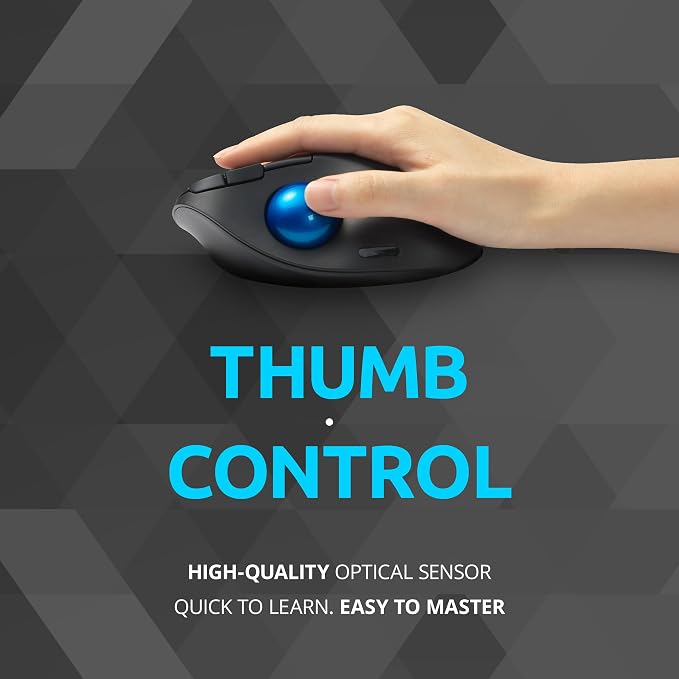
- Ergonomic Design - The sculpted ergonomic design and smooth thumb control provides all-day comfort and features a unique 45° tilt that helps improve wrist and forearm alignment
- Dual Wireless Connectrion - TB450 includes a choice of Bluetooth Low Energy (LE) and 2.4GHz wireless connection (2.4GHz nano receiver included)
- Long Battery Life - TB450 has long battery life means up to 18 months of use with 2.4GHz and up to 15 months of use with Bluetooth
- High-Quality Optical Tracking - A high-quality optical sensor accurately tracks the 34mm thumb-operated trackball, giving users smooth cursor control and optimal precision. The TB450 offers easy cursor speed transitions with 4 DPI options: 400, 800, 1200, 1600
- 128-bit AES Encryption - include government-grade 128-bit AES encryption for enhanced security to deter hackers from monitoring wireless connection and capturing sensitive information
| Connectivity Technology | 2.4Ghz wireless, Bluetooth |
| Additional Features | Ergonomic Design, Lightweight, Programmable Buttons, Wireless |
| Movement Detection | Trackball |
| Button Quantity | 6 |
| Hand Orientation | Right |
| Compatible Devices | Personal Computer, Tablet |
| Operating System | Windows, macOS |
| Battery Average Life | 18 months |
| Number of Batteries | 1 AA batteries required. (included) |
| Hardware Platform | Mac, PC |
| Power Source | Battery Powered |
| Mouse Maximum Sensitivity | 1600 Dots per Inch (4064 cm) |
| Minimum Required Operating System Version | Mac OS 14 Sonoma, Windows 11 |
| Range | 10.0 meters |
| Color | Black/Blue |
| Style Name | Thumb Operated |
| Enclosure Material | Plastic |
| Brand | Kensington |
| Model Name | ProFit Ergo TB450 |
| Antenna Location | Office |
| Model Number | K72194WW |
| Built-In Media | 1 x AA Alkaline Battery, Pro Fit® Ergo TB450 Trackball, Quick Start Guide, Compliance Sheet, USB-A Receiver, Warranty Card, Welcome Card |
| Are Batteries Included | Yes |
| Are Batteries Required | Yes |
| Manufacturer | Kensington |
| UPC | 085896721949 |
| Global Trade Identification Number | 00085896721949 |
| Mfr Part Number | K72194WW |
| Item Weight | 129 Grams |
| Item Dimensions L x W | 5.44"L x 3.68"W (13.8 cm) |
| Unit Count | 1.0 Count |
| Special Feature | Ergonomic Design, Lightweight, Programmable Buttons, Wireless |
| Movement Detection Technology | Trackball |
What's in the box
Pro Fit® Ergo TB450 Trackball
USB-A Receiver
Quick Start Guide, Compliance Sheet
Warranty Card, Welcome Card
1 x AA Alkaline Battery
Who Should Buy?

-
Ergonomic Users
Ideal for users seeking comfortable design to reduce wrist strain during prolonged computer use.
-
Multitaskers
Perfect for those who need to connect and switch between multiple devices seamlessly and efficiently.
-
Precision Workers
Beneficial for graphic designers or gamers requiring high precision with adjustable DPI settings for customized control.

-
Gaming Enthusiasts
May not meet the requirements of hardcore gamers needing rapid response times and specific gaming features.
-
Casual Users
Basic users looking for an inexpensive and simple mouse may find this trackball too complex and costly.
-
Traveling Professionals
Its size and design might be less portable compared to simple compact mice for users on the go.
Product Description
Have any Query? Chat with us
Customer Questions & Answers
-
Question:
What makes the Kensington TB450A trackball mouse different from standard mice?
Answer: The Kensington TB450A trackball mouse offers a unique design that allows you to control the cursor using a stationary ball, which can significantly reduce wrist strain. This ergonomic advantage is ideal for users who spend long hours navigating on computers, especially in tight workspaces. Moreover, it provides customizable DPI settings (up to 4 options) to enhance accuracy depending on your tasks, making it perfect for graphic design, gaming, or everyday use. -
Question:
Can the Kensington TB450A trackball mouse connect to multiple devices?
Answer: Yes, the Kensington TB450A trackball mouse can connect to up to three devices using both Bluetooth LE and 2.4GHz wireless technology. This feature is incredibly beneficial for users who switch frequently between devices such as a laptop, tablet, or desktop. By seamlessly pairing with multiple devices, it streamlines workflow and eliminates the need for multiple mice, thus enhancing productivity. -
Question:
How do I switch between devices connected to the Kensington TB450A?
Answer: Switching between connected devices on the Kensington TB450A is straightforward. Simply press the dedicated device switch button located on the mouse. This lets you toggle quickly and efficiently without the need to disconnect or reconnect, making it ideal for professionals who multitask across different systems. This seamless transition supports a more productive working environment. -
Question:
What are the DPI settings available on the Kensington TB450A, and why are they important?
Answer: The Kensington TB450A features four DPI settings, allowing users to adjust the sensitivity of the mouse from precision control to faster cursor movement. Having multiple DPI options is crucial for various tasks—for example, lower settings are ideal for graphic design or detailed work, while higher settings cater to gaming or larger displays. This versatility enhances user experience, allowing for optimal performance in diverse scenarios. -
Question:
Is the Kensington TB450A compatible with all operating systems?
Answer: The Kensington TB450A trackball mouse is designed to be compatible with a range of operating systems, including Windows, macOS, and Chrome OS. This broad compatibility ensures that users across different platforms can enjoy its ergonomic benefits and versatile features. Whether you're a home user, a student, or in an office environment, it caters to a wide audience, enhancing cross-platform usability. -
Question:
What kind of battery does the Kensington TB450A use, and how long does it last?
Answer: The Kensington TB450A trackball mouse uses a standard AA battery. The battery life is designed to be efficient, allowing you to use the mouse for extended periods before needing a replacement. This longevity is especially important for users who rely on their mouse throughout the day. With proper usage, you can expect months of functionality, making it a practical choice for continuous use. -
Question:
Is the Kensington TB450A suitable for gaming?
Answer: Yes, the Kensington TB450A can be suitable for gaming, especially in genres that benefit from precision control such as strategy or simulation games. The customizable DPI settings allow gamers to adjust sensitivity for optimal performance. While it may not replace traditional gaming mice for fast-paced shooters, its ergonomic design ensures comfort during long gaming sessions, catering to players seeking a different kind of control scheme. -
Question:
How do I clean and maintain the Kensington TB450A trackball mouse?
Answer: To clean and maintain the Kensington TB450A trackball mouse, regularly remove the ball and clean the surrounding area using a soft, damp cloth. It's also advisable to clean the ball itself to ensure smooth tracking. Maintaining cleanliness aids in preserving the performance of the mouse and extends its lifespan, making it a good practice for all users to adopt. -
Question:
Can the Kensington TB450A be used by left-handed users?
Answer: While the Kensington TB450A trackball mouse is primarily designed for right-handed users, it can also be used comfortably by left-handed users, thanks to its symmetrical design. However, left-handed users might need to adapt to its control layout. The mouse's adjustable DPI and ergonomic benefits can still provide a satisfying experience for left-handed individuals, making it a versatile option. -
Question:
Where can I buy the Kensington TB450A Wireless Trackball Mouse in Kenya?
Answer: You can buy the Kensington TB450A Wireless Trackball Mouse from Ubuy in Kenya. Ubuy is a reliable e-commerce platform that offers a wide selection of electronics, including this trackball mouse. Their service provides a smooth online shopping experience, and you can easily find the product by visiting their website or using their app.
Kensington Trackballs K72194WW Editorial Review


No editorial reviews found
Customer Reviews & Ratings
567 customers ratings
-
5 Star
62%
-
4 Star
17%
-
3 Star
9%
-
2 Star
4%
-
1 Star
8%
Review this product
Share your thoughts with other customers
Platform Trust & Buyer Confidence

MT
Mohd
Verified buyer
“The product received very good packaging & safe…Thank You”
16 June 2026 · via Trustpilot
SJ
Shawati
Verified buyer
“Accurate delivery timing given”
16 June 2026 · via Trustpilot
YB
Youcef
Verified buyer
“Not madly expensive like I thought, and much quicker than promised.”
15 June 2026 · via Trustpilot
LM
Leila
Verified buyer
“Never dealt with Ubuy before, but everything worked out great. Seamless cross border purchasing and shipping. Thanks!”
6/7/2026 · via Trustpilot
KA
Kwame
Verified buyer
“The process was smooth, with clear communication and timelines. This was my 1st purchase and I am really impressed. I will definitely be coming back.”
12 June 2026 · via Trustpilot
Secure Checkout
Global Delivery
Easy Returns
Genuine Products
Product Price History
Important information
- Limitations : For products shipped internationally, please note that any manufacturer warranty may not be valid; manufacturer service options may not be available; product manuals, instructions, and safety warnings may not be in destination country languages; the products (and accompanying materials) may not be designed in accordance with destination country standards, specifications, and labeling requirements; and the products may not conform to destination country voltage and other electrical standards (requiring use of an adapter or converter if appropriate). The recipient is responsible for assuring that the product can be lawfully imported to the destination country. When ordering from Ubuy or its affiliates, the recipient is the importer of record and must comply with all laws and regulations of the destination country.
- Not all the products listed on Ubuy are for sale, as Ubuy is a global search engine. Products are subject to export/trade regulations.
KES 6257
Order now and get it around Saturday, July 25
This item is not restrict in my country.(Please click on above link if this item is not restrict in your country, So our team will review and allow.)
QTY:
Only 10 items left in stock.
Secured transaction
PCI DSS compliant and ISO 27001:2022 certified, with encrypted payments and full buyer protection on every order.
Our Top Logistics Partners
Fastest cross-border delivery
Features & Benefits
- Ergonomic design provides all-day comfort with a 45° tilt for wrist alignment.
- Offers both Bluetooth Low Energy and 2.4GHz wireless connection options.
- Long battery life: up to 18 months using 2.4GHz and 15 months with Bluetooth.
- Features a patented ball ejection system for easy cleaning.
- High-quality optical tracking with smooth cursor control and four adjustable DPI settings.
- 50% of the plastic used is recycled material for an eco-friendly choice.
Ubuy Assurance
Experience worry-free shopping with 100% original products, PCI DSS-compliant payment security, ISO 27001-certified data protection, the fastest cross-border delivery, free returns *, and secure packaging on every order.