0 ratings
OLED for Samsung Galaxy Note 20 Ultra Screen Replacement for Samsung Note 20 Ultra LCD Display SM-N985 SM-N986U LCD Digitizer Touch Assembly Black with Frame+Installation Video(Support Fingerprint)
High quality LCD display touch screen digitizer assembly replacement kit for Samsung Galaxy Note20 Ultra 5G
OLED for Samsung Galaxy Note 20 Ultra Screen Replacement for Samsung Note 20 Ultra LCD Display SM-N985 SM-N986U LCD Digitizer Touch Assembly Black with Frame+Installation Video(Support Fingerprint)
Item #: 78664681

OLED for Samsung Galaxy Note 20 Ultra Screen Replacement for Samsung Note 20 Ultra LCD Display SM-N985 SM-N986U LCD Digitizer Touch Assembly Black

Item #: 78664681

KES 53190

Price Details

Excluding Shipping & Custom charges ( Shipping and custom charges will be calculated on checkout )

*All items will import from US

0 ratings Write a review
In stock
us Imported from USA store

QTY:

Order now and get it around Wednesday, July 22
Our Top Logistics Partners
  • fedex
  • dhl
High quality LCD display touch screen digitizer assembly replacement kit for Samsung Galaxy Note20 Ultra 5G
U-Care Warranty:
None
Select a Plan
fast shipping

Fast
Shipping

free return

Free
Return*

secure packaging

Secure Packaging

100% original products

100% Original Products

pci-dss

PCI DSS Compliance

iso certified

ISO 27001 Certified


paypal payment
visa payment
mastercard payment
mobile money payment
Note: Step Down Voltage Transformer required for using electronics products of US store (110-120). Recommended power converters Buy Now.

What Stands Out

OLED Technology
Experience vivid colors and deep blacks with OLED technology, enhancing your viewing experience and providing superior image quality compared to standard displays.
Fingerprint Support
This screen replacement maintains fingerprint functionality, ensuring seamless user experience and security without compromising on design while replacing your damaged screen.
Comprehensive Kit
Includes LCD digitizer, touch assembly, and installation video, providing everything needed for an easy and straightforward installation to revive your Samsung Galaxy Note 20 Ultra.

Product Details

Shop OLED for Samsung Galaxy Note 20 Ultra Screen Replacement for Samsung Note 20 Ultra LCD Display SM-N985 SM-N986U LCD Digitizer Touch Assembly Black with Frame+Installation Video(Support Fingerprint) online at a best price in Kenya. B0CH9KRM5T
Item Weight0.5 lbs (230 grams)

Who Should Buy?

Suitable For
  • DIY Repair Enthusiasts

    Those who enjoy repairing their devices themselves will benefit from the included installation video and tools.

  • Cost-Conscious Users

    Individuals looking to save money compared to professional repairs can utilize this affordable replacement option.

  • Fingerprint Support Needers

    Users who prioritize fingerprint sensor functionality will appreciate that this replacement maintains that capability.

Not Suitable For
  • Non-Technical Users

    Users unfamiliar with device repair may struggle with the installation process without professional assistance.

  • Warranty Holders

    Replacing the screen independently could void manufacturer warranties, making it unsuitable for warranty-dependent users.

  • Urgent Repair Seekers

    Individuals needing immediate repairs may find this product unsuitable as it requires installation time and effort.

Product Description

OLED for Samsung Galaxy Note 20 Ultra Screen Replacement for Samsung Note 20 Ultra LCD Display SM-N985 SM-N986U LCD Digitizer Touch Assembly Black with Frame+Installation Video(Support Fingerprint)

Have any Query? Chat with us

Customer Questions & Answers

  • Question: What is included in the OLED screen replacement package for Samsung Galaxy Note 20 Ultra?

    Answer: The OLED screen replacement package for the Samsung Galaxy Note 20 Ultra typically includes the OLED display, LCD digitizer, and touch assembly. This comprehensive assembly is designed to ensure a seamless fit and function with your existing device components. The all-in-one setup greatly simplifies the repair process and eliminates the need for additional purchases, making it an ideal solution for those looking to restore their device’s display without hassle. Whether you're repairing a cracked screen or addressing display issues like dead pixels, this replacement has you covered.
  • Question: How do I install the OLED screen replacement for Samsung Galaxy Note 20 Ultra?

    Answer: Installing the OLED screen replacement involves several crucial steps. First, power off the device and remove the back cover. Next, carefully disconnect the battery and remove the broken screen using heat and suction tools. Once the old screen is removed, align the new OLED display with the device frame and connect it to the motherboard. Finally, replace the battery, seal the back cover, and power on the device. Proper installation is essential to ensure your screen works flawlessly and lasts a long time, making this guidance vital for DIY enthusiasts or technicians alike.
  • Question: Is the OLED screen replacement compatible with both SM-N985 and SM-N986U models?

    Answer: Yes, the OLED screen replacement is specifically designed to be compatible with both the SM-N985 and SM-N986U models of the Samsung Galaxy Note 20 Ultra. This compatibility ensures that users of either model can replace their screens without concerns about mismatched parts. It also simplifies the selection process for individuals looking to restore their device. Users can confidently purchase this replacement, knowing it will fit perfectly without modification.
  • Question: What are the signs that I need to replace my Galaxy Note 20 Ultra screen?

    Answer: Signs that may indicate you need to replace your Galaxy Note 20 Ultra screen include a cracked or shattered display, unresponsive touch functionality, color distortion, or flickering. If the screen displays vertical or horizontal lines, it’s a clear indication of a failing LCD. Noticing any combination of these issues can severely impact usability. By opting for an OLED screen replacement, users can ensure their device functions like new, enhancing their overall experience.
  • Question: Can I replace the screen myself or should I seek a professional repair service?

    Answer: While replacing the screen yourself is possible with the right tools and a detailed guide, it requires a level of comfort with electronic repairs. If you possess the necessary skills and patience, a DIY repair can be rewarding and cost-effective. However, if you're uncertain or lack experience, seeking a professional repair service can save time and prevent potential further damage. Knowing your limits is key; many people appreciate the peace of mind that comes with expert assistance.
  • Question: What tools do I need for replacing the Samsung Galaxy Note 20 Ultra screen?

    Answer: To replace the Samsung Galaxy Note 20 Ultra screen, you will need a handful of tools: a heat gun to soften adhesive, a suction cup tool for lifting the screen, precision screwdrivers to remove internal screws, a plastic opening tool to pry components apart, and tweezers for delicate handling. These tools ensure that you can effectively and safely manage the components without causing additional harm to your device. Investing in these tools can facilitate a smoother repair process for those inclined towards DIY projects.
  • Question: Will replacing the screen affect my phone's performance?

    Answer: Replacing your Galaxy Note 20 Ultra screen with a high-quality OLED assembly will not negatively affect your phone's performance. In fact, it often enhances it by restoring full functionality and visual clarity. A new screen ensures that touch responsiveness is as intended, fixing problems that might have arisen from a damaged display. Users can expect improved interaction with their device, making replacements beneficial for long-term usability.
  • Question: What if I accidentally damage the OLED screen during installation?

    Answer: If you accidentally damage the OLED screen during installation, it’s essential to assess the extent of the damage immediately. Depending on the severity, you may need to purchase a replacement OLED again. Being cautious and following installation guides closely can mitigate these risks. Consider watching video tutorials beforehand or practicing with lower-cost parts if you are inexperienced. Achieving a successful installation comes with practice and preparation.
  • Question: How do I know if I’m buying an authentic OLED screen for my Note 20 Ultra?

    Answer: To ensure you are purchasing an authentic OLED screen for your Galaxy Note 20 Ultra, buy from reputable sellers who provide detailed product descriptions and specifications. Look for feedback and ratings from previous buyers to gauge the seller's reliability. Authentic parts often come with manufacturer branding or identifiers. Avoid overly cheap options, as these may indicate inferior quality. Doing thorough research will help you make informed purchasing decisions.
  • Question: Where can I buy OLED for Samsung Galaxy Note 20 Ultra screen replacement in Kenya?

    Answer: You can buy the OLED for Samsung Galaxy Note 20 Ultra screen replacement from Ubuy in Kenya. Ubuy is known for its extensive selection of mobile replacement parts, ensuring you receive a compatible and high-quality OLED assembly for your device. The platform simplifies your purchasing experience with various options and reliable customer support to assist with your needs. By shopping on Ubuy, you are promoting convenience and accessibility while ensuring your screen gets restored properly.

AGCUT Screens Editorial Review

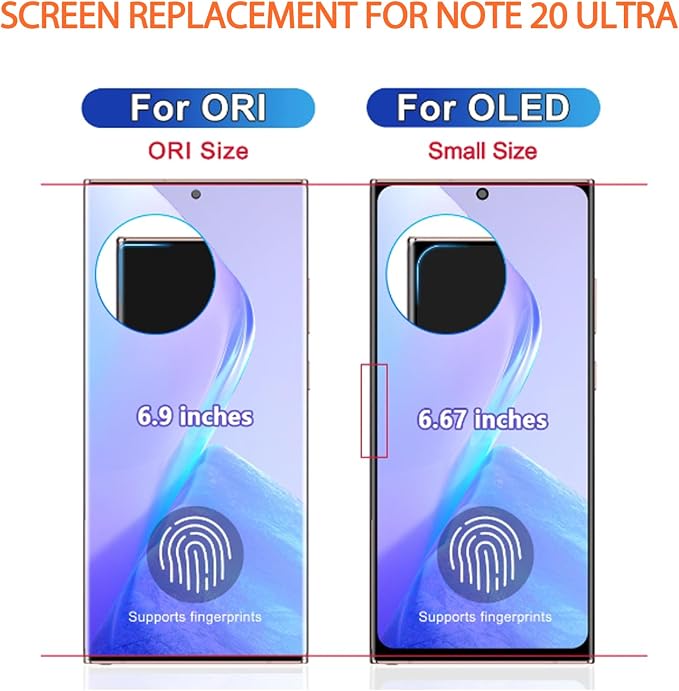
The OLED screen replacement for the Samsung Galaxy Note 20 Ultra has received mixed reviews. Installation can be time-Consuming, as one user mentioned, but the display quality is good once installed. However, there are occasional issues with the colors on the screen turning green, which can be fixed by locking and unlocking the phone. Some users have noted that the replacement screen does not support the fingerprint sensor, leading to a return. Additionally, there is a complaint about the thicker bezel of the replacement screen, causing the edges to disappear from the phone. Overall, while the display quality is praised, issues with installation, color distortion, fingerprint sensor support, and bezel thickness have been raised by users. **

Customer Reviews & Ratings

4.0
1 customers ratings
  • 5 Star
    0%
  • 4 Star
    100%
  • 3 Star
    0%
  • 2 Star
    0%
  • 1 Star
    0%

Review this product

Share your thoughts with other customers

Pros

  • Good display quality

Cons

  • Time-Consuming installation

Product Price History

Important information

  • Limitations : For products shipped internationally, please note that any manufacturer warranty may not be valid; manufacturer service options may not be available; product manuals, instructions, and safety warnings may not be in destination country languages; the products (and accompanying materials) may not be designed in accordance with destination country standards, specifications, and labeling requirements; and the products may not conform to destination country voltage and other electrical standards (requiring use of an adapter or converter if appropriate). The recipient is responsible for assuring that the product can be lawfully imported to the destination country. When ordering from Ubuy or its affiliates, the recipient is the importer of record and must comply with all laws and regulations of the destination country.
  • Not all the products listed on Ubuy are for sale, as Ubuy is a global search engine. Products are subject to export/trade regulations.