0 ratings


Item #:
69919514
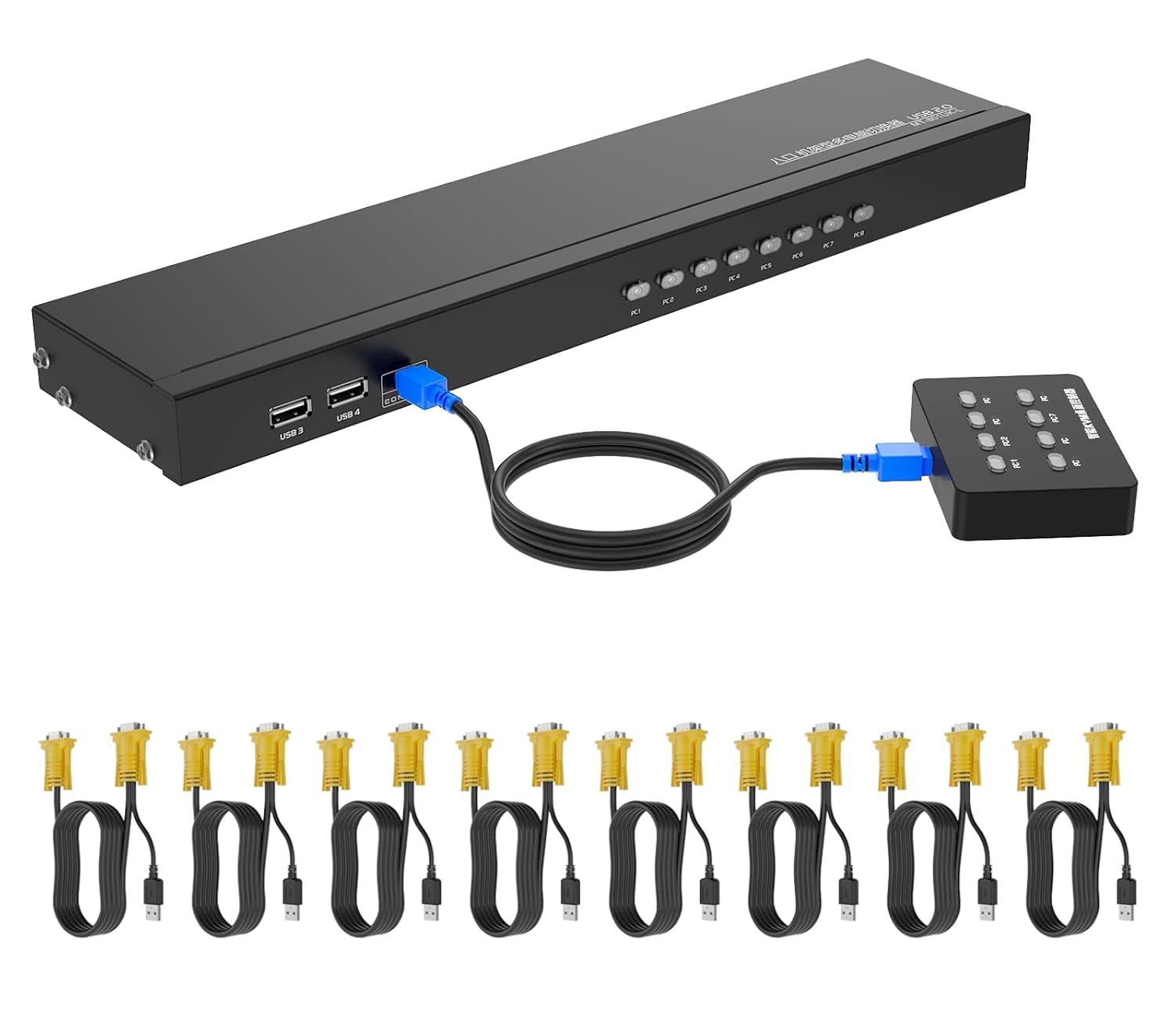
1U Rackmount KVM Console HDMI 8 Port + Cables, 4K@30Hz USB HDMI KVM Switch 8x1 + 4 USB Hubs + Wired Desktop Selector + Remote + Rack Mount Ears
Item #:
69919514
KES 21069
Price Details
Excluding Shipping & Custom charges ( Shipping and custom charges will be calculated on checkout )
*All items will import from US
0 ratings
Write a review
In stock
 Imported from USA store
QTY:
Order now and get it around Monday, June 29
Secured transaction
Ubuy works hard to protect your security and privacy. Our advanced payment security system ensures confidentiality by encrypting your information during transmission using AES (Advanced Encryption Standards) and SSL (Secure Socket Layer) protocols. Your payment details are 100% secure as we do not share your payment details with third party sellers.
Our Top Logistics Partners


HDMI KVM Switch 8 Port allows you to manage up to 8 computers by 1 monitor, keyboard and mouse at 4K 30hz HD quality.

Fast
Shipping

Free
Return*

Secure Packaging

100% Original Products

PCI DSS Compliance

ISO 27001 Certified


Note: Step Down Voltage Transformer required for using electronics products of US store (110-120). Recommended power converters Buy Now.


What Stands Out
8 Ports
Effortlessly connect and switch between eight devices, streamlining your workspace without the need for multiple displays. Ideal for managing multiple computers securely and efficiently.
4K@30Hz Support
Experience stunning visuals with 4K resolution up to 30Hz, ensuring high-quality display performance for gaming and multimedia applications. Perfect for users who demand crisp and clear output.
Remote Control
Conveniently switch between connected devices from a distance with an IR remote control, enhancing user experience for presentations or managing multiple devices without manual intervention.
Product Details
| Item Weight | 2.1 lbs (950 grams) |
Who Should Buy?

-
IT Professionals
Manage multiple servers and computers efficiently while reducing desktop clutter with this KVM switch.
-
Home Office Users
Switch between work and personal laptops effortlessly, enhancing productivity during work-from-home scenarios.
-
Gamers
Connect multiple gaming systems and enjoy easy switching between them without compromising on video quality.

-
High-End Gamers
The 4K@30Hz output may not satisfy those needing higher refresh rates for competitive gaming.
-
Occasional Users
Casual users may find a KVM switch unnecessary for their infrequent switching needs between devices.
-
Single Device Users
Those with only one computer will not benefit from the multi-device capabilities of this KVM switch.
Product Description
1U Rackmount KVM Console HDMI 8 Port + Cables, 4K@30Hz USB HDMI KVM Switch 8x1 + 4 USB Hubs + Wired Desktop Selector + Remote + Rack Mount Ears
Have any Query? Chat with us
Customer Questions & Answers
-
Question:
What is a KVM switch and how does it work?
Answer: A KVM switch (Keyboard, Video, Mouse) allows you to control multiple computers using a single set of peripherals. It works by connecting the keyboard, mouse, and monitor to the KVM switch, which then interfaces with multiple computers. You simply switch between them, usually via a button or remote control, to access different systems without the clutter of multiple keyboards and mice. This is particularly useful in server rooms or workstations where space is limited and efficiency is key. -
Question:
What does 4K@30Hz mean in the context of this KVM switch?
Answer: 4K@30Hz refers to the video resolution and refresh rate supported by the KVM switch. 4K resolution is 3840x2160 pixels, offering sharper images and finer detail compared to lower resolutions. The 30Hz refresh rate indicates how frequently the image updates per second. This setup is perfect for applications that require high-definition visuals, such as graphic design, video editing, or gaming. However, if you need smoother motion in fast-paced gaming scenarios, you might look for options that support higher refresh rates. -
Question:
How many computers can I connect with the Yinker KVM switch?
Answer: The Yinker KVM Switch can connect up to 8 computers. This flexibility allows you to manage multiple systems from a single workstation, streamlining tasks and minimizing desk clutter. Each computer can easily be accessed through the switch without the need for additional peripherals. This feature is particularly advantageous for IT professionals, content creators, or anyone who needs to multitask across various devices seamlessly. -
Question:
What types of cables are included with the KVM switch?
Answer: The KVM switch package includes 9 cables: HDMI cables for video output and USB cables for keyboard and mouse connectivity. These bundled cables reduce the hassle of purchasing additional components, ensuring a complete setup right out of the box. By using high-quality cables that support 4K@30Hz output, you can maintain the best video quality and input responsiveness when switching between computers. -
Question:
Can I control the KVM switch remotely?
Answer: Yes, the Yinker KVM switch comes with an IR remote, allowing you to switch between connected computers without needing to physically access the switch. This feature is particularly useful in setups where the switch is hard to reach or in a confined space. It enhances user convenience, especially in professional environments, as it enables smooth transitions between tasks without interruption. -
Question:
What does the USB 2.0 hub feature offer?
Answer: The KVM switch features 4 USB 2.0 hubs, which allow you to connect peripheral devices like printers, external drives, or webcams. This integrated functionality simplifies connections and reduces the clutter of additional USB hubs in your workspace. Managing multiple devices with ease is essential for efficient workflow, making this feature ideal for multitasking environments or home offices where several devices are used simultaneously. -
Question:
What are the advantages of using a rack-mounted KVM switch?
Answer: A rack-mounted KVM switch like the Yinker saves valuable space and provides a professional appearance for your setup. It can be housed in a server rack, which is essential for organizations managing multiple servers or systems within limited physical space. This setup improves organization and secures equipment while providing easy access for maintenance and operations, making it suitable for data centers or IT environments. -
Question:
Is the KVM switch compatible with different operating systems?
Answer: Yes, the Yinker KVM switch is designed to be compatible with multiple operating systems, including Windows, Linux, and macOS. This compatibility ensures that you can use it interchangeably with various computers regardless of their setup. This makes it an excellent choice for users in mixed-environment offices or homes where different operating systems are used across devices. -
Question:
How do I switch between computers using this KVM switch?
Answer: Switching between computers using the Yinker KVM switch can be done using the front panel buttons or the included IR remote. The intuitive switch design and remote control function make it user-friendly, allowing for quick transitions between devices. This capability is especially beneficial during presentations or collaborative work, as it enables users to access and control various systems without interruptions. -
Question:
Where can I buy KVM Switch HDMI 8 Port, Yinker 4K@30Hz USB HDMI Rack KVM Console?
Answer: You can purchase the KVM Switch HDMI 8 Port, Yinker 4K@30Hz USB HDMI Rack KVM Console from Ubuy in Kenya. Ubuy offers a convenient online shopping experience, ensuring access to this versatile KVM switch along with various other electronic products. With their easy navigation and reliable service, you can find and order the KVM switch, making it a perfect choice for streamlining your workspace.
Yinker KVM Switches Editorial Review
The Yinker HDMI KVM Switch 8 Port is a versatile device that allows users to switch between 8 HDMI devices with ease. With wide compatibility, users can switch between not just computers but also HDMI devices like TiVO. The device also comes with a desktop selector, IR remote and rack mount ears, as well as 2in1 KVM cables and 4 USB 2.0 hubs. Customers have praised the device for its ease of use and compatibility with a range of devices. The availability of the user manual online has been appreciated by those who have lost the manual. The device can function and defunction AUTO SCAN by the button on the IR remote. One customer raised a query about the cable length for the IR control box and was informed that there is no need to connect a cable to the IR remote but the device can be controlled wirelessly from up to 16ft/5m away. The cable length of the wired desktop controller is 6ft/2m. Overall, the Yinker HDMI KVM Switch 8 Port has received positive feedback for its versatility, ease of use, and compatibility with a range of devices.
Customer Reviews & Ratings
1 customers ratings
-
5 Star
100%
-
4 Star
0%
-
3 Star
0%
-
2 Star
0%
-
1 Star
0%
Review this product
Share your thoughts with other customers
Pros
- Versatile device
- Wide compatibility with a range of devices, not just computers
- Comes with desktop selector, IR remote, and rack mount ears
- User manual available online
- AUTO SCAN can be controlled via the IR remote
Product Price History
Important information
- Limitations : For products shipped internationally, please note that any manufacturer warranty may not be valid; manufacturer service options may not be available; product manuals, instructions, and safety warnings may not be in destination country languages; the products (and accompanying materials) may not be designed in accordance with destination country standards, specifications, and labeling requirements; and the products may not conform to destination country voltage and other electrical standards (requiring use of an adapter or converter if appropriate). The recipient is responsible for assuring that the product can be lawfully imported to the destination country. When ordering from Ubuy or its affiliates, the recipient is the importer of record and must comply with all laws and regulations of the destination country.
- Not all the products listed on Ubuy are for sale, as Ubuy is a global search engine. Products are subject to export/trade regulations.
KES 21069
Order now and get it around Monday, June 29
This item is not restrict in my country.(Please click on above link if this item is not restrict in your country, So our team will review and allow.)
QTY:
Secured transaction
Ubuy works hard to protect your security and privacy. Our advanced payment security system ensures confidentiality by encrypting your information during transmission using AES (Advanced Encryption Standards) and SSL (Secure Socket Layer) protocols. Your payment details are 100% secure as we do not share your payment details with third party sellers.
Our Top Logistics Partners
Fastest cross-border delivery
Features & Benefits
- Manage up to 8 computers with 1 monitor, keyboard, and mouse
- Supports wireless keyboard and mouse, plug 4 USB hubs
- 3 switching ways: Panel Button, wired desktop selector, IR remote control
- Plug and play, no software required
- Widely compatible with Windows, Mac OS, Linux
- Supports resolution up to 4K 3840*2160