0 ratings
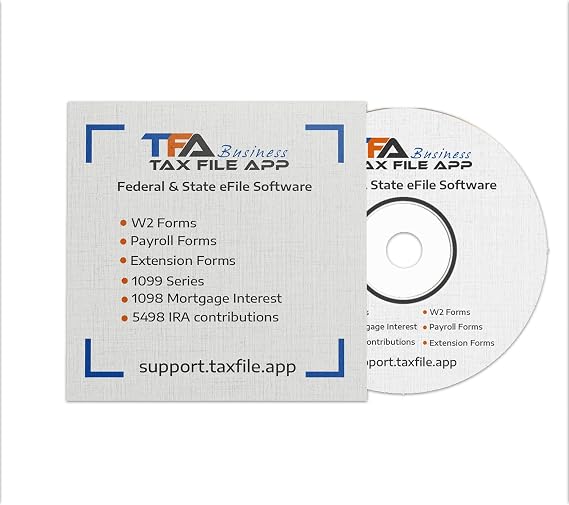
TFA Software for Tax Form Filing, Print, Mail, and efile W2 and 1099 Forms for Windows
The most affordable with intuitive interface for small businesses and tax professionals to file W2, 1099 tax forms.
TFA Software for Tax Form Filing, Print, Mail, and efile W2 and 1099 Forms for Windows
Item #: 96912916

TFA Software for Tax Form Filing, Print, Mail, and efile W2 and 1099 Forms for Windows

Item #: 96912916

KES 104980

Price Details

Excluding Shipping & Custom charges ( Shipping and custom charges will be calculated on checkout )

*All items will import from US

0 ratings Write a review
Out of stock
us Imported from USA store
Our Top Logistics Partners
  • fedex
  • dhl
The most affordable with intuitive interface for small businesses and tax professionals to file W2, 1099 tax forms.
U-Care Warranty:
None
Select a Plan
fast shipping

Fast
Shipping

free return

Free
Return*

secure packaging

Secure Packaging

100% original products

100% Original Products

pci-dss

PCI DSS Compliance

iso certified

ISO 27001 Certified


paypal payment
visa payment
mastercard payment
mobile money payment
Note: Step Down Voltage Transformer required for using electronics products of US store (110-120). Recommended power converters Buy Now.

What Stands Out

Comprehensive Tax Solutions
TFA Software provides an all-in-one platform for filing, printing, mailing, and e-filing W2 and 1099 forms, streamlining the tax process for businesses and ensuring compliance with tax regulations.
User-Friendly Interface
Designed for Windows, TFA Software boasts an intuitive interface that simplifies navigation and reduces the learning curve, making tax filing accessible even for non-technical users.
Cost-Effective
TFA Software offers competitive pricing compared to other tax software, delivering exceptional value for businesses looking to minimize expenses while ensuring accurate and timely tax submissions.

Product Details

Shop TFA Software for Tax Form Filing, Print, Mail, and efile W2 and 1099 Forms for Windows online at a best price in Kenya. B0CPGPX3LY
Item Weight0.4 lbs (180 grams)

Who Should Buy?

Suitable For
  • Small Businesses

    Ideal for small businesses needing reliable software to efficiently manage W2 and 1099 forms and filing.

  • Freelancers

    Freelancers can streamline their tax filings, ensuring accuracy and compliance while saving time preparing forms.

  • Accounting Professionals

    Accountants can benefit from automated features to simplify bulk processing of multiple client forms during tax season.

Not Suitable For
  • Large Corporations

    Larger companies may require more robust systems with advanced features beyond the scope of TFA software.

  • Mac Users

    Designed for Windows, Mac users will find compatibility issues and may need alternative tax software solutions.

  • Non-Technical Users

    Individuals with limited tech skills might struggle with installation and usage, making simpler solutions preferable.

Product Description

TFA Software for Tax Form Filing, Print, Mail, and efile W2 and 1099 Forms for Windows

Have any Query? Chat with us

Customer Questions & Answers

  • Question: What is TFA Software and what functions does it perform?

    Answer: TFA Software is a comprehensive tax management tool designed to assist users in filing, printing, mailing, and e-filing W2 and 1099 forms. It simplifies the entire tax form process by providing users with features to calculate taxes accurately, generate necessary forms, and submit them electronically or through traditional mail. Use cases include small businesses needing to report employee wages and independent contractors needing to file 1099s, all while ensuring compliance with federal tax laws.
  • Question: Is TFA Software compatible with all Windows versions?

    Answer: Yes, TFA Software is designed to be compatible with various versions of Windows, ensuring that users can access its features across different systems. Compatibility is essential for running the software smoothly and avoiding any technical issues. Users should check system requirements, such as operating system version and hardware specifications before installation, especially for older systems which may have limitations.
  • Question: Can I e-file W2 and 1099 forms using TFA Software?

    Answer: Absolutely! TFA Software allows users to e-file both W2 and 1099 forms directly to the IRS, streamlining the filing process considerably. By using e-filing, users can save time and minimize errors associated with paper filing. This feature is particularly beneficial for businesses handling large volumes of forms, as it automates data transmission and provides instant confirmation of successful submissions.
  • Question: How does TFA Software ensure data security during tax filings?

    Answer: TFA Software prioritizes data security by implementing strong encryption protocols designed to protect sensitive information during tax filings. This includes safeguarding personal and financial details throughout the filing process. Users can be confident that their data is secure while they file electronically, crucial for maintaining compliance and protecting against identity theft.
  • Question: What types of tax forms can I file with TFA Software?

    Answer: TFA Software supports a variety of tax forms, specifically focusing on W2 and 1099 forms, which are essential for employers and contractors. It helps prepare both standard forms and variations like 1099-MISC or 1099-NEC. This versatility is beneficial for businesses of all sizes, allowing them to manage their tax documentation efficiently across different financial scenarios.
  • Question: Is TFA Software user-friendly for non-technical individuals?

    Answer: Yes, TFA Software is designed with user-friendliness in mind, featuring a straightforward interface that simplifies navigation and form completion. The guided workflows help users enter data accurately, making it manageable for those who may not be tech-savvy. This approach ensures that even users unfamiliar with tax filing can confidently use the software to handle their tax obligations.
  • Question: Can TFA Software help me with state tax filings as well?

    Answer: Yes, TFA Software provides options for state tax filings, allowing users to prepare and submit state-specific tax forms in addition to federal forms. This is important for businesses operating in multiple states, as it ensures compliance with varying state regulations. Users can manage all necessary filings from one platform, simplifying tax season across different jurisdictions.
  • Question: How does TFA Software handle form updates for tax regulation changes?

    Answer: TFA Software continuously updates its forms to comply with latest tax regulations and guidelines set forth by the IRS. Users are notified of any updates that might affect their filings, ensuring that they always have access to the most current and compliant forms. This feature is particularly helpful during tax season when timely compliance is crucial for avoiding penalties.
  • Question: Can TFA Software be used for bulk filing of tax forms?

    Answer: Yes, TFA Software supports bulk filing capabilities, allowing users to file multiple forms at once, which can significantly reduce time and effort during tax preparation. This feature is particularly useful for businesses with a high volume of employees or contractors, enabling them to efficiently manage and file numerous tax forms all at once without repetitive entry of information.
  • Question: Where can I buy TFA Software for Tax Form Filing, Print, Mail, and efile W2 and 1099 Forms for Windows?

    Answer: You can purchase TFA Software for Tax Form Filing for Windows at Ubuy. Ubuy offers a user-friendly online platform where customers can easily find and buy software products tailored to their needs. By choosing Ubuy, you can benefit from a streamlined shopping experience while accessing a variety of software options to meet your tax filing requirements.

Tax Form Solutions Tax Forms Editorial Review

The TFA Software for Tax Form Filing has garnered a mixed reception among users, emphasizing both its strengths and shortcomings. Customers appreciate the software's comprehensive functionality for filing, printing, mailing, and e-filing W2 and 1099 forms, which streamlines the tax preparation process. Many users have highlighted the user-friendly interface, making it accessible even for those who may not be tech-savvy. The ability to import data directly from accounting software has also been a notable feature, reducing the time spent on manual entry. However, several users have encountered some technical issues, particularly related to software updates and compatibility with certain operating systems. Additionally, a few customers reported challenges in customer support responsiveness, which hindered their ability to resolve issues promptly. While the software generally meets the needs of small businesses and independent contractors, some users expressed a desire for more robust customer service and more frequent updates to enhance the software’s performance. Overall, TFA Software serves as a valuable tool for tax preparation, particularly for small to medium-sized businesses looking for an efficient way to manage their tax forms. Nevertheless, Prospective users should Consider potential technical hurdles and the quality of customer support when making a decision. **

Customer Reviews & Ratings

5.0
1 customers ratings
  • 5 Star
    100%
  • 4 Star
    0%
  • 3 Star
    0%
  • 2 Star
    0%
  • 1 Star
    0%

Review this product

Share your thoughts with other customers

Pros

  • Comprehensive functionality for W2 and 1099 filing.
  • User-friendly interface suitable for all experience levels.
  • Ability to import data from accounting software.
  • Efficient and time-saving features for tax preparation.

Cons

  • InConsistent customer support responsiveness.

Product Price History

Important information

  • Limitations : For products shipped internationally, please note that any manufacturer warranty may not be valid; manufacturer service options may not be available; product manuals, instructions, and safety warnings may not be in destination country languages; the products (and accompanying materials) may not be designed in accordance with destination country standards, specifications, and labeling requirements; and the products may not conform to destination country voltage and other electrical standards (requiring use of an adapter or converter if appropriate). The recipient is responsible for assuring that the product can be lawfully imported to the destination country. When ordering from Ubuy or its affiliates, the recipient is the importer of record and must comply with all laws and regulations of the destination country.
  • Not all the products listed on Ubuy are for sale, as Ubuy is a global search engine. Products are subject to export/trade regulations.