- Home Page /
- Office Products /
- Office Electronics /
- Printers & Accessories /
- Computer Printers /
- Inkjet Computer Printers /
- Ink Tank Printers /
- Epson Workforce Pro WF-C4310 Desktop Wireless...
0 ratings




Item #:
148313026
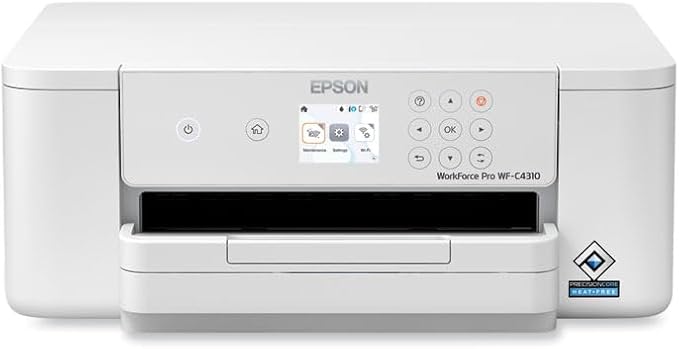
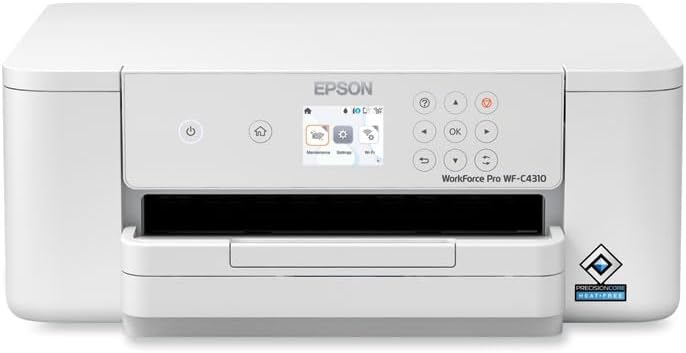
Epson Workforce Pro WF-C4310 Desktop Wireless Inkjet Printer - Color - 4800 x 1200 dpi Print - Automatic Duplex Print - 250 Sheets Input - Ethernet -
Item #:
148313026
KES 36348
Price Details
Excluding Shipping & Custom charges ( Shipping and custom charges will be calculated on checkout )
*All items will import from US
0 ratings
Write a review
In stock
 Imported from USA store
QTY:
Only 2 items left in stock.
Order now and get it around Sunday, July 05
Secured transaction
Ubuy works hard to protect your security and privacy. Our advanced payment security system ensures confidentiality by encrypting your information during transmission using AES (Advanced Encryption Standards) and SSL (Secure Socket Layer) protocols. Your payment details are 100% secure as we do not share your payment details with third party sellers.
Our Top Logistics Partners


Streamline your business's workflow and increase efficiency with the WorkForce Pro WF-C4310 Color Printer.

Fast
Shipping

Free
Return*

Secure Packaging

100% Original Products

PCI DSS Compliance

ISO 27001 Certified


Note: Step Down Voltage Transformer required for using electronics products of US store (110-120). Recommended power converters Buy Now.


What Stands Out
High-Quality Prints
Delivers stunning color prints with a resolution of 4800 x 1200 dpi, ensuring your documents and images stand out with clarity and vibrancy.
Wireless Connectivity
Easily connect via Ethernet or Wireless LAN, allowing for seamless printing from multiple devices without the clutter of cables.
Automatic Duplexing
Saves time and resources with automatic double-sided printing, reducing paper usage and improving efficiency for busy office environments.
Product Details
- Recommended Use: Plain Paper Print
- Print Color Capability: Color
- ISO Mono Print Speed (ppm): 21
- ISO Color Print Speed (ppm): 11
- First Print Speed: 9.3 Second
| Printer Type | Inkjet |
| Other Special Features of the Product | Auto-Duplex |
| Printer Output Type | Color |
| Item Weight | 17.2 Pounds (7.8 kg) |
| Item Dimensions D x W x H | 17.6"D x 19.7"W x 10.7"H (44.7 x 50 x 27.2 cm) |
| Print media | Paper (plain) |
| Maximum Copy Speed Black and White | 21 ppm |
| Compatible Devices | A wide range of devices with USB, Ethernet, Wi-Fi Direct, or wireless LAN capabilities |
| Ink Color | cyan, magenta, yellow, black |
| Additional Printer Functions | Scan |
| Control Method | Touch |
| Number of Trays | 1 |
| Number of Drivers | 1 |
| Resolution | 4800 x 1200, 4800 x 2400 |
| Display Type | LCD |
| Maximum Media Size | US Letter (8.5 x 11 inches) or A4 (210 x 297 mm) |
| Maximum Sheet Capacity | 250 |
| Paper Size | 14 inches (35.6 cm) |
| Maximum print Resolution Color | 4800 x 1200 Dots Per Inch (12192 cm) |
| Maximum Print Resolution Black and White | 4800 x 1200 |
| Dual-sided printing | Yes |
| Duplex | Automatic |
| Maximum Copy Resolution Color | 4800 x 2400 dpi |
| Maximum Copy Resolution Black and White | 4800 x 1200 dpi |
| Brand | Epson |
| Model Name | C11CK18201 |
| Model Number | C11CK18201 |
| Built-In Media | WorkForce Pro WF-C4310 Color Printer, Manual, Power cord, 4 x DURABrite Ultra initial ink cartridges (1x Black Ink cartridge and 3x color ink cartridges: 1x Cyan, 1x Magenta, 1x Yellow) |
| Model Series | WF-C43 |
| Specific Uses For Product | Plain Paper Print |
| UPC | 010343968806 |
| Manufacturer | Epson |
| Unit Count | 1.0 Count |
| Color Pages per Minute | 11 ppm |
| B&W Pages per Minute | 21 ppm |
| Initial Page Print Time | 9.3 Seconds |
| Color | White |
| Color Depth | 1 bpp |
| Printer Connectivity Type | Ethernet |
| Hardware Interface | Ethernet |
| Number of Ethernet Ports | 1 |
| Total USB 2.0 Ports | 1 |
| Total Usb Ports | 1 |
| Connectivity Technology | Ethernet |
| Printing Technology | Inkjet |
| Special Feature | Auto-Duplex |
| Printer Output | Color |
| Maximum Print Speed (Color) | 11 ppm |
| Max Printspeed Monochrome | 21 ppm |
What's in the box
WorkForce Pro WF-C4310 Color Printer, Manual, Power cord, 4 x DURABrite Ultra initial ink cartridges (1x Black Ink cartridge and 3x color ink cartridges: 1x Cyan, 1x Magenta, 1x Yellow)
Who Should Buy?

-
Small Offices
Ideal for small businesses needing efficient, high-quality color prints with low operational costs and fast print speeds.
-
Home Users
Great for home users who require versatile printing options including photo printing and document management.
-
Creative Professionals
Perfect for designers and artists who need vibrant, high-resolution prints for presentations and portfolios.

-
High-Volume Printing
Not suitable for environments requiring very high print volumes; may not perform as well under heavy usage.
-
Budget-Conscious Users
May be more expensive than alternative options, which can deter users strictly focused on minimizing printing costs.
-
Mobile-Only Users
Not ideal for users who exclusively print from mobile devices without requiring additional connectivity options.
Product Description
Have any Query? Chat with us
Customer Questions & Answers
-
Question:
What type of print quality can I expect from the Epson Workforce Pro WF-C4310?
Answer: The Epson Workforce Pro WF-C4310 delivers exceptional print quality, offering a resolution of 4800 x 1200 dpi. This high resolution is particularly beneficial for producing vibrant color documents, photos, and graphics with sharp details and rich colors. With its advanced ink technology, this printer is ideal for users who require professional-quality prints for presentations, marketing materials, or family photos, ensuring that every printed piece looks polished and professional. -
Question:
Does the Epson Workforce Pro WF-C4310 support automatic duplex printing?
Answer: Yes, the Epson Workforce Pro WF-C4310 features automatic duplex printing, which allows you to print on both sides of a sheet of paper without needing to manually flip it over. This capability not only saves you time but also reduces paper usage, making it an environmentally friendly choice. It's perfect for creating double-sided reports or documents, enhancing productivity for home offices or small businesses. -
Question:
How many sheets can the Epson Workforce Pro WF-C4310 hold?
Answer: The Epson Workforce Pro WF-C4310 has a substantial input capacity of 250 sheets. This allows for longer print runs without the need for frequent paper reloading, making it efficient for printing large documents or multiple copies. Additionally, the printer’s design accommodates various paper types, so you can easily switch between standard letter paper and specialty media such as cardstock. -
Question:
Is the Epson Workforce Pro WF-C4310 a wireless printer?
Answer: Yes, the Epson Workforce Pro WF-C4310 is a wireless inkjet printer, allowing you to print from various devices without the hassle of cords. It supports both Wi-Fi and Ethernet connectivity, making it flexible for different office setups or remote work scenarios. You can print directly from your smartphone or tablet through compatible apps, enabling convenient printing from anywhere within your network. -
Question:
What types of media can I use with the Epson Workforce Pro WF-C4310?
Answer: The Epson Workforce Pro WF-C4310 is compatible with various media types including plain paper, photo paper, envelopes, and specialty media like labels and card stock. This versatility means you can create anything from professional business documents to personalized greeting cards. Whether you’re printing documents for work or crafting projects at home, this printer meets diverse printing needs. -
Question:
Are ink cartridges easy to replace in the Epson Workforce Pro WF-C4310?
Answer: Yes, replacing ink cartridges in the Epson Workforce Pro WF-C4310 is a straightforward process. The printer is designed for easy access, allowing you to quickly change cartridges without any technical hassle. Regular maintenance can help ensure optimal performance, keeping your prints vibrant and consistent. This feature is especially beneficial for busy offices where downtime should be minimized. -
Question:
Can I print from mobile devices with the Epson Workforce Pro WF-C4310?
Answer: Absolutely! The Epson Workforce Pro WF-C4310 supports mobile printing through various apps such as Epson iPrint. This means you can send documents to print directly from your smartphones or tablets, making it extremely convenient for on-the-go printing needs. Whether you need to print a last-minute presentation or a photo while away from your desk, this feature adds significant flexibility to your printing experience. -
Question:
What connectivity options does the Epson Workforce Pro WF-C4310 offer?
Answer: The Epson Workforce Pro WF-C4310 offers multiple connectivity options including Wi-Fi, Ethernet, and USB. This variety ensures that you can easily connect the printer to your office network or personal devices according to your preferences. The Ethernet connection is particularly useful for stable, high-speed printing in a busy office environment. The flexibility in connectivity options is a great asset for users with diverse printing needs. -
Question:
What are the benefits of having a desktop printer like the Epson Workforce Pro WF-C4310?
Answer: Having a desktop printer like the Epson Workforce Pro WF-C4310 offers numerous benefits, including space efficiency and the ability to print documents at your convenience. It's ideal for small office setups or home use where desk space is limited. This printer combines robust functionality with modern technology, ensuring you can handle everyday printing tasks efficiently and without interruption. -
Question:
Where can I buy the Epson Workforce Pro WF-C4310 in Kenya?
Answer: You can conveniently purchase the Epson Workforce Pro WF-C4310 from Ubuy in Kenya. Ubuy is a trusted e-commerce platform known for a wide selection of high-quality electronics and accessories, making it a reliable choice for your printer purchase. Their website provides detailed product information, user reviews, and competitive options, helping you make informed decisions before buying.
Epson Ink Tank Printers C11CK18201 Editorial Review
No editorial reviews found
Customer Reviews & Ratings
2 customers ratings
-
5 Star
100%
-
4 Star
0%
-
3 Star
0%
-
2 Star
0%
-
1 Star
0%
Review this product
Share your thoughts with other customers
Pros
- High-quality color printing
- Fast print speeds
- Automatic duplex printing
- Large paper capacity
- Easy wireless connectivity
Cons
- Slightly bulky design.
Product Price History
Important information
- Limitations : For products shipped internationally, please note that any manufacturer warranty may not be valid; manufacturer service options may not be available; product manuals, instructions, and safety warnings may not be in destination country languages; the products (and accompanying materials) may not be designed in accordance with destination country standards, specifications, and labeling requirements; and the products may not conform to destination country voltage and other electrical standards (requiring use of an adapter or converter if appropriate). The recipient is responsible for assuring that the product can be lawfully imported to the destination country. When ordering from Ubuy or its affiliates, the recipient is the importer of record and must comply with all laws and regulations of the destination country.
- Not all the products listed on Ubuy are for sale, as Ubuy is a global search engine. Products are subject to export/trade regulations.
KES 36348
Order now and get it around Sunday, July 05
This item is not restrict in my country.(Please click on above link if this item is not restrict in your country, So our team will review and allow.)
QTY:
Only 2 items left in stock.
Secured transaction
Ubuy works hard to protect your security and privacy. Our advanced payment security system ensures confidentiality by encrypting your information during transmission using AES (Advanced Encryption Standards) and SSL (Secure Socket Layer) protocols. Your payment details are 100% secure as we do not share your payment details with third party sellers.
Our Top Logistics Partners
Fastest cross-border delivery
Features & Benefits
- Enhance productivity with monthly page volume up to 1,600 pages.
- Achieve fast print speeds of 21 ppm (black) and 11 ppm (color).
- Print high-quality documents and photos at resolutions up to 4800 x 2400 dpi.
- Enjoy wireless connectivity options including Wi-Fi Direct and Bluetooth.
- Automatic duplex printing and a 250-sheet input tray for optimal usage.
- Utilizes PrecisionCore Heat-Free Technology for lower power consumption.