0 ratings
ProtoArc USB Trackpad for Windows 1011
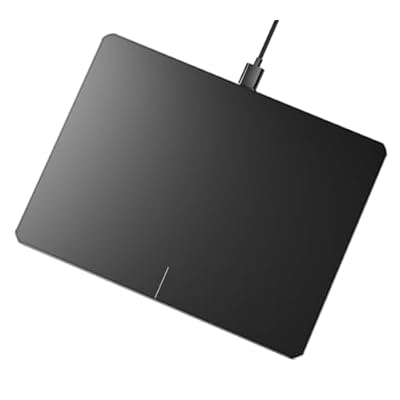
Experience high-precision multi-touch navigation like never before with the ultra-slim ProtoArc USB Trackpad.
ProtoArc USB Trackpad for Windows 1011
Item #: 101459114

ProtoArc USB Trackpad for Windows 1011

Item #: 101459114

KES 9215

Price Details

Excluding Shipping & Custom charges ( Shipping and custom charges will be calculated on checkout )

*All items will import from US

0 ratings Write a review
Out of stock
us Imported from USA store
Our Top Logistics Partners
  • fedex
  • dhl
Experience high-precision multi-touch navigation like never before with the ultra-slim ProtoArc USB Trackpad.
U-Care Warranty:
None
Select a Plan
fast shipping

Fast
Shipping

free return

Free
Return*

secure packaging

Secure Packaging

100% original products

100% Original Products

pci-dss

PCI DSS Compliance

iso certified

ISO 27001 Certified


paypal payment
visa payment
mastercard payment
mobile money payment
Note: Step Down Voltage Transformer required for using electronics products of US store (110-120). Recommended power converters Buy Now.

What Stands Out

Enhanced Precision
The ProtoArc USB Trackpad offers superior accuracy and responsiveness for Windows 10/11 users, ensuring smooth navigation and seamless multitasking, surpassing traditional mouse options.
Multi-Touch Support
Equipped with advanced multi-touch capabilities, this trackpad allows for intuitive gestures such as pinch-to-zoom and swipe, enhancing user experience while managing applications effortlessly.
Ergonomic Design
Designed for comfort, the ProtoArc trackpad features a sleek design that reduces wrist strain and promotes a healthier posture, making it perfect for prolonged use, unlike conventional desktop peripherals.

Product Details

Shop ProtoArc USB Trackpad for Windows 1011 online at a best price in Kenya. B0DK6YS1QJ
Item Weight0.6 lbs (270 grams)

Who Should Buy?

Suitable For
  • Graphic Designers

    Offers precise control and multitouch gestures for seamless navigation in design software, enhancing creativity and workflow.

  • Office Professionals

    Improves productivity with gesture controls for easier document management and quick access to essential functions.

  • Writers and Coders

    Facilitates smooth scrolling and easy navigation, allowing for longer writing or coding sessions without discomfort.

Not Suitable For
  • Gamers

    Lacks the precision and responsiveness required for fast-paced gaming, making it unsuitable for serious gamers.

  • Casual Users

    Basic users may not find the advanced features necessary, making traditional mice a simpler option.

  • Heavy Laptop Users

    Those who already use built-in touchpads might not see significant benefits from an external trackpad.

Product Description

ProtoArc USB Trackpad for Windows 1011

Have any Query? Chat with us

Customer Questions & Answers

  • Question: What operating systems are compatible with the ProtoArc USB Trackpad?

    Answer: The ProtoArc USB Trackpad is specifically designed for Windows 10 and 11 systems. This ensures seamless integration and functionality with your computer, allowing users to take full advantage of multi-touch gestures and high precision navigation. Whether you're working on creative projects, browsing the web, or navigating documents, this trackpad delivers an intuitive experience that can enhance productivity. Users often find it particularly beneficial for tasks such as photo editing, where precision is key, or for those who prefer a laptop-style control on a desktop.
  • Question: How does the high precision navigation feature of the trackpad work?

    Answer: The high precision navigation of the ProtoArc USB Trackpad is made possible by advanced sensors that accurately track finger movements. This technology allows for finer control when moving the cursor, making it ideal for tasks requiring precision, such as graphic design or detailed spreadsheet work. Additionally, the touchpad supports various gestures like pinch-to-zoom and three-finger swipe, which can significantly speed up navigation and multitasking. This is especially useful for power users who rely on gestures to improve their workflow efficiency.
  • Question: Is the ProtoArc Trackpad portable?

    Answer: Yes, the ProtoArc Trackpad is designed to be ultra-slim and lightweight, making it highly portable. Its sleek aluminum design not only adds a touch of elegance but also ensures that it can easily fit into a laptop bag or even a briefcase. This makes it an excellent choice for professionals who are always on the go, as it allows them to maintain productivity in various work environments or while traveling. Users can easily set it up in cafes or co-working spaces, providing a comfortable alternative to using a laptop’s built-in trackpad.
  • Question: What are the benefits of using a wired trackpad?

    Answer: Using a wired trackpad like the ProtoArc USB Trackpad provides several benefits, including consistent connectivity and zero latency. Unlike wireless devices that may experience lag or connection drops, a wired trackpad ensures that your commands are executed instantaneously. This can be particularly beneficial for gamers or professionals who require precise movements without any delay. Furthermore, you won’t need to worry about battery life, making this trackpad a reliable choice for extended use during work or creative projects.
  • Question: Can the ProtoArc Trackpad be customized for different gestures?

    Answer: Yes, the ProtoArc USB Trackpad often allows for customizable gestures through settings within the Windows operating system or specific software that you may install. Users can adjust the sensitivity and functions of the touchpad gestures based on personal preference, tailoring their experience to maximize productivity. This flexibility makes it suitable for users who have specific workflows or who may want to simplify their interactions with applications, such as quickly switching between tasks or enhancing accessibility for different user needs.
  • Question: What materials are used in the construction of the ProtoArc Trackpad?

    Answer: The ProtoArc USB Trackpad is crafted from durable aluminum, providing both a sleek aesthetic and robust build quality. This not only enhances its visual appeal but also contributes to its sturdiness, making it capable of withstanding regular use without compromising performance. The aluminum surface also allows for smooth gestures and easy cleaning, ensuring that the trackpad remains functional and visually tidy. It’s an excellent choice for users who appreciate a quality design alongside performance.
  • Question: What dimensions should I expect from the ProtoArc Trackpad?

    Answer: The ProtoArc USB Trackpad is designed with dimensions that make it both spacious and manageable for desktop use. While specific measurements can vary, it typically offers a large surface area that comfortably accommodates gestures and movements, allowing users to navigate with ease. This spacious design is ideal for multitasking scenarios where switching between different applications or documents is frequent. Users will appreciate having ample space to perform gestures without feeling restricted, which can be particularly helpful during intensive tasks.
  • Question: How does the ProtoArc Trackpad compare to a traditional mouse?

    Answer: The ProtoArc USB Trackpad offers a different experience compared to traditional mice by prioritizing touch-based navigation. While a mouse can provide precision, a trackpad allows for fluid finger movements and gestures, supporting a more natural interaction with digital content. This can be particularly beneficial for users who prefer gesture controls for tasks like scrolling, zooming, or switching between applications. Additionally, those who spend prolonged hours on computers may find trackpads to be more ergonomic, potentially reducing wrist strain associated with using a mouse.
  • Question: Can I use the ProtoArc Trackpad with my gaming setup?

    Answer: While the ProtoArc USB Trackpad primarily targets productivity and general navigation, it can be used in a gaming setup for casual gaming experiences. Its high precision navigation can help with mouse-driven games, particularly for strategy or simulation genres. However, it’s noteworthy that gamers often prefer traditional mice that provide additional buttons and higher responsiveness for competitive gaming scenarios. Users looking for versatility might appreciate having both devices available, allowing them to switch based on their gaming needs.
  • Question: Where can I buy the ProtoArc USB Trackpad in Kenya?

    Answer: You can purchase the ProtoArc USB Trackpad in Kenya from Ubuy, a reputable online store that offers a wide range of electronics and accessories. Ubuy provides detailed product descriptions and user reviews that can help you decide if this trackpad meets your needs. Their platform is user-friendly, making it easy to find and buy the desired gadget. Check Ubuy for any available promotions or bundle deals that enhance your shopping experience while acquiring this innovative trackpad.

ProtoArc Touch Pads Editorial Review

The ProtoArc USB Trackpad has garnered a generally positive reception among customers, particularly for its premium build quality and efficient functionality. Users have been impressed by its aluminum casing, which provides a sturdy feel unlike many plastic alternatives in the market. The trackpad is both sleek and portable, making it suitable for a variety of computing environments, including multi-screen setups. Installation is straightforward, with users noting the simplicity of plug-and-play operation — no additional drivers are needed. Navigational accuracy is a highlight, with many praising its responsiveness across different screen sizes, including ultra-wide displays. The multi-gesture feature works well, allowing for smooth scrolling, zooming, and window management, significantly enhancing productivity and user experience. However, some feedback points to a lack of sensitivity, with a few users wishing for a more responsive cursor movement, indicating that while the tactile nature of the clicking is satisfactory, it could benefit from slight improvements in implementation. The physical buttons, while functional, have been described as feeling somewhat cheap, and a preference for a seamless surface similar to that of Apple devices was expressed. Overall, the ProtoArc USB Trackpad stands out for its premium Construction, ease of use, and effective gesture control, despite some minor concerns regarding sensitivity and the physical button design. **

Customer Reviews & Ratings

5.0
1 customers ratings
  • 5 Star
    100%
  • 4 Star
    0%
  • 3 Star
    0%
  • 2 Star
    0%
  • 1 Star
    0%

Review this product

Share your thoughts with other customers

Pros

  • Premium aluminum Construction
  • Plug-and-play installation with no drivers required
  • High accuracy for multi-screen setups
  • Smooth multi-gesture functionality (scrolling, zooming, window management)
  • Portable and sleek design

Cons

  • Lack of sensitivity for some users

Product Price History

Important information

  • Limitations : For products shipped internationally, please note that any manufacturer warranty may not be valid; manufacturer service options may not be available; product manuals, instructions, and safety warnings may not be in destination country languages; the products (and accompanying materials) may not be designed in accordance with destination country standards, specifications, and labeling requirements; and the products may not conform to destination country voltage and other electrical standards (requiring use of an adapter or converter if appropriate). The recipient is responsible for assuring that the product can be lawfully imported to the destination country. When ordering from Ubuy or its affiliates, the recipient is the importer of record and must comply with all laws and regulations of the destination country.
  • Not all the products listed on Ubuy are for sale, as Ubuy is a global search engine. Products are subject to export/trade regulations.



