- Home Page /
- Mobile Phone Accessories /
- Mobile Phone Accessories /
- Maintenance, Upkeep & Repairs /
- Replacement Parts /
- Screens /
- OLED for Samsung Galaxy Note 20 Ultra Screen ...
0 ratings


Item #:
139167067
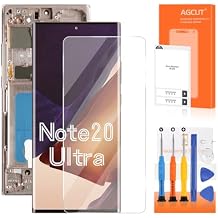
OLED for Samsung Galaxy Note 20 Ultra Screen Replacement for Samsung Note 20 Ultra LCD Display SM-N985 SM-N986U LCD Digitizer Touch Assembly Gold
77% of respondents would recommend this to a friend
Item #:
139167067
KES 16558
Price Details
Excluding Shipping & Custom charges ( Shipping and custom charges will be calculated on checkout )
*All items will import from US
0 ratings
Write a review
In stock
 Imported from USA store
QTY:
Order now and get it around Monday, September 21
Secured transaction
Ubuy works hard to protect your security and privacy. Our advanced payment security system ensures confidentiality by encrypting your information during transmission using AES (Advanced Encryption Standards) and SSL (Secure Socket Layer) protocols. Your payment details are 100% secure as we do not share your payment details with third party sellers.
Our Top Logistics Partners


With a strict quality control process, our Samsung Note 20 Ultra OLED screen replacement is 100% intact, ensuring no scratches or dead pixels.

Fast
Shipping

Free
Return*

Secure Packaging

100% Original Products

PCI DSS Compliance

ISO 27001 Certified




Note: Step Down Voltage Transformer required for using electronics products of US store (110-120). Recommended power converters Buy Now.


What Stands Out
High-Quality OLED
Experience vibrant colors and deep contrasts with this premium OLED display, ensuring an immersive viewing experience for movies, games, and daily tasks on your Samsung Galaxy Note 20 Ultra.
Easy Installation
Designed for a seamless fit, this replacement display allows for straightforward installation, enabling users to replace broken screens effortlessly without professional assistance.
Fingerprint Support
Maintains full functionality of the fingerprint sensor, providing the convenience of secure unlocking without compromising the sleek design and feel of your Galaxy Note 20 Ultra.
Product Details
| Country of Origin | This item will be imported from US |
| Item Weight | 0.5 lbs (230 grams) |
| What is in the box | OLED for Samsung Galaxy... For more details, please check description/product details |
Who Should Buy?

-
DIY Repair Enthusiasts
Perfect for users interested in fixing their own devices without professional help, saving money and time.
-
Frequent Phone Users
Ideal for individuals who use their phones daily and require a reliable screen to accommodate heavy usage.
-
Budget-Conscious Buyers
Great choice for those looking for an affordable replacement option without compromising on screen quality.

-
Non-Technical Users
Not suitable for users unfamiliar with phone repairs, as installation can be complex and risky.
Product Description
OLED for Samsung Galaxy Note 20 Ultra Screen Replacement for Samsung Note 20 Ultra LCD Display SM-N985 SM-N986U LCD Digitizer Touch Assembly Gold with Frame (Support Fingerprint)
Have any Query? Chat with us
Customer Questions & Answers
-
Question:
What is the OLED screen replacement for the Samsung Galaxy Note 20 Ultra?
Answer: The OLED screen replacement for the Samsung Galaxy Note 20 Ultra is a high-quality display unit designed to replace a damaged or malfunctioning screen on your device. It features an integrated LCD digitizer touch assembly, ensuring full functionality with vibrant colors and sharp image quality. Installing this replacement can restore your phone to its original visual performance, making it ideal for users who want to maintain the premium display experience of their device. -
Question:
How do I install the OLED screen replacement for the Samsung Note 20 Ultra?
Answer: Installing the OLED screen replacement involves careful disassembly of your device. You’ll need the right tools, like a heat gun, suction cup, and a set of precision screwdrivers. Start by powering off your phone, heating the edges, and gently lifting the old screen using the suction cup. Disconnect the damaged display and replace it with the new unit by following the reverse process. For those unfamiliar with tech repairs, seeking professional assistance or watch tutorial videos may be beneficial. -
Question:
What tools are required for replacing the Samsung Galaxy Note 20 Ultra screen?
Answer: To replace the Samsung Galaxy Note 20 Ultra screen, you’ll typically need a heat gun or hairdryer, a suction cup tool, plastic opening tools, and a set of precision screwdrivers (including Pentalobe and Phillips types). These tools help ensure that you can safely detach the old display without damaging other internal components, making it possible for you to successfully complete the replacement process. -
Question:
What should I do if the new OLED screen doesn't work?
Answer: If your new OLED screen doesn’t work, first ensure that all connections are properly secured and the device is powered on. It’s essential to check for any visible damage to the new screen. If everything appears normal but the screen still doesn’t respond, there might be compatibility issues or an issue with the installation process. In such cases, consulting a professional technician could provide clarity and further assistance to resolve the issue. -
Question:
Will replacing the screen affect my phone's functionality?
Answer: Replacing the screen will not affect your phone's functionality if done correctly. In fact, a new OLED display will restore visual clarity and touchscreen responsiveness, enhancing your overall user experience. It’s crucial to use quality replacement parts, like the ones designed specifically for the Samsung Galaxy Note 20 Ultra, to ensure optimal performance and accuracy in touch sensitivity. -
Question:
What are the benefits of using an OLED screen for my Note 20 Ultra?
Answer: Using an OLED screen for your Samsung Galaxy Note 20 Ultra offers multiple benefits, including vibrant colors, deep blacks, and improved contrast ratios, which contribute to an exceptional viewing experience. OLED technology also consumes less power than traditional LCDs, allowing for better battery efficiency. This makes the device more enjoyable for watching videos, gaming, and browsing, essentially enhancing daily usage. -
Question:
How can I maintain the quality of my new Samsung Note 20 Ultra OLED screen?
Answer: To maintain the quality of your new OLED screen, it’s important to use a protective case to prevent physical damage and a screen protector to avoid scratches. Additionally, avoid exposing your phone to extreme temperatures and moisture. Regularly cleaning the screen with a microfiber cloth can also help preserve clarity and responsiveness, ensuring that the display remains in top condition. -
Question:
Is the installation of the OLED screen replacement easy for beginners?
Answer: Installation of the OLED screen replacement can be challenging for beginners. It requires a certain level of comfort with handling small electronic components and tools. While some may successfully follow online tutorials, others might find it daunting and risk damaging their device. Those with limited experience should consider professional assistance to ensure proper installation and avoid potential pitfalls. -
Question:
Where can I buy the OLED screen replacement for the Samsung Galaxy Note 20 Ultra?
Answer: You can purchase the OLED screen replacement for the Samsung Galaxy Note 20 Ultra on Ubuy. This platform offers a variety of options, ensuring you find the right display that fits your needs. Ubuy is known for its reliable selection of phone accessories and components, ensuring you receive a product that meets quality standards for your device. -
Question:
What should I check before purchasing an OLED screen replacement?
Answer: Before purchasing an OLED screen replacement, check for compatibility with your specific device model (like SM-N985 or SM-N986U). Verify the seller’s credibility, read reviews about the product’s quality, and look for detailed specifications on the screen assembly being offered. Additionally, consider whether the listing provides necessary tools and instructions, which could aid in the installation process.
AGCUT Screens Editorial Review
No editorial reviews found
Customer Reviews & Ratings
1 customers ratings
-
5 Star
100%
-
4 Star
0%
-
3 Star
0%
-
2 Star
0%
-
1 Star
0%
Review this product
Share your thoughts with other customers
Pros
- High-quality display
- Easy installation process
- Good touch sensitivity
- Accurate color reproduction
- Compatible with multiple models
Cons
- Color may differ slightly from original.
Platform Trust & Buyer Confidence

JK
Jasmin
Verified buyer
“Great products and very good service: very easy and very fast international delivery.”
9 September 2026 · via Trustpilot
AG
Anke
Verified buyer
“Wonderful online shopping experience, smooth transaction from the start. Payment method works conveniently and delivery is unexpectedly fast and reliable. You go the extra mile for service. What makes this even more amazing, you deliver to Namibia. I will remain a happy Ubuy customer and will increase my purchases for sure! Thank you!”
10 September 2026 · via Trustpilot
H
Hazel
Verified buyer
“Very easy to find the products what you need, and so fast delivery, that’s why I highly recommended to others costumers to used ubuy.”
10 September 2026 · via Trustpilot
O
Opaleye
Verified buyer
“I received exactly what I ordered I was skeptical about your site because that was my first time to order. But the order came timely and neatly packaged. I was not disappointed. Thank you.”
11 September 2026 · via Trustpilot
AC
Adele
Verified buyer
“Easy to find and order what you want on the website. Delivery is quick to the UK”
8 September 2026 · via Trustpilot
Secure Checkout
Global Delivery
Easy Returns
Genuine Products
Product Price History
Important information
- Limitations : For products shipped internationally, please note that any manufacturer warranty may not be valid; manufacturer service options may not be available; product manuals, instructions, and safety warnings may not be in destination country languages; the products (and accompanying materials) may not be designed in accordance with destination country standards, specifications, and labeling requirements; and the products may not conform to destination country voltage and other electrical standards (requiring use of an adapter or converter if appropriate). The recipient is responsible for assuring that the product can be lawfully imported to the destination country. When ordering from Ubuy or its affiliates, the recipient is the importer of record and must comply with all laws and regulations of the destination country.
- Not all the products listed on Ubuy are for sale, as Ubuy is a global search engine. Products are subject to export/trade regulations.
KES 16558
Order now and get it around Monday, September 21
This item is not restrict in my country.(Please click on above link if this item is not restrict in your country, So our team will review and allow.)
QTY:
Secured transaction
PCI DSS compliant and ISO 27001:2022 certified, with encrypted payments and full buyer protection on every order.
Our Top Logistics Partners
Fastest cross-border delivery
Features & Benefits
- Designed specifically for Samsung Galaxy Note 20 Ultra 5G.
- Features an OLED screen with high color saturation and resolution.
- Includes a durable gold frame for easy installation.
- Strict quality control ensures no defects; tested before shipment.
- Fingerprints supported; close quality to the original screen.
- DIY installation possible with simple tools.
Ubuy Assurance
Experience worry-free shopping with 100% original products, PCI DSS-compliant payment security, ISO 27001-certified data protection, the fastest cross-border delivery, free returns *, and secure packaging on every order.