0 ratings
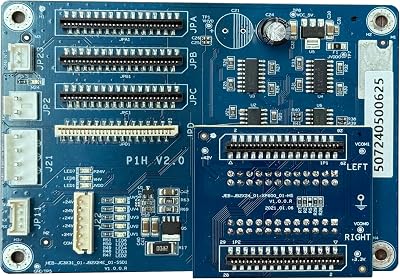
Motherboard for DTF Printer XP600 Motherboard
This motherboard supports fast transfers, smoother and faster print jobs can be achieved, thus increasing the efficiency of the printing process.
Motherboard for DTF Printer XP600 Motherboard

Motherboard for DTF Printer XP600 Motherboard

0 ratings Write a review
Out of stock
us Imported from USA store
Our Top Logistics Partners
  • fedex
  • dhl
This motherboard supports fast transfers, smoother and faster print jobs can be achieved, thus increasing the efficiency of the printing process.
U-Care Warranty:
None
Select a Plan
fast shipping

Fast
Shipping

free return

Free
Return*

secure packaging

Secure Packaging

100% original products

100% Original Products

pci-dss

PCI DSS Compliance

iso certified

ISO 27001 Certified


paypal payment
visa payment
mastercard payment
mobile money payment
Note: Step Down Voltage Transformer required for using electronics products of US store (110-120). Recommended power converters Buy Now.

Product Details

Shop Motherboard for DTF Printer XP600 Motherboard online at a best price in Kenya. B0F18J7SV6
ManufacturerMZK
Date First AvailableMarch 12, 2025
BrandMZK
CPU SocketL1800
Compatible DevicesPrinter
RAM Memory TechnologyDDR
Compatible Processorswindows
Chipset Typel1800
Memory Clock Speed2
PlatformWindows 8
Memory Slots Available1

Product Description

Motherboard for DTF Printer XP600 Motherboard

Have any Query? Chat with us

Customer Questions & Answers

  • Question: What is the function of the motherboard in the DTF printer XP600?

    Answer: The motherboard in a DTF printer XP600 is the central circuit that controls the printer's functions. It manages the communication between various components such as the print head, motors, and electronic sensors. By executing commands from the printer's software, it ensures precise printing operations. If the motherboard is malfunctioning, it may lead to issues like print quality degradation or printer errors, making it essential for optimal performance.
  • Question: How do I diagnose issues with the XP600 motherboard?

    Answer: To diagnose issues with the XP600 motherboard, start by checking for any error messages on the printer's display. Inspect cables and connections for any signs of damage or disconnection. Additionally, listen for unusual sounds during operation; clicking or grinding noises might indicate hardware issues. If problems persist, involving a technician to run advanced diagnostics can provide a thorough examination of the motherboard and other related components.
  • Question: What specifications should I look for when buying a motherboard for the XP600?

    Answer: When purchasing a motherboard for the XP600, ensure it meets specific specifications like compatibility with the printer model, the number of input/output ports, and support for the latest firmware. Additionally, check the quality of components to ensure durability and reliability. Knowing these specifications helps in maximizing the performance of your printer and extending its lifespan.
  • Question: Can I replace the motherboard in my DTF printer myself?

    Answer: Replacing the motherboard in your DTF printer can be done independently, provided you have basic technical skills. Start by ensuring the printer is unplugged and gather necessary tools like a screwdriver and anti-static wrist strap. Carefully document the wiring and connections to ensure proper reassembly. However, if you feel uncertain, it’s advisable to consult a professional, as improper installation can lead to further complications.
  • Question: What are common symptoms of a faulty XP600 motherboard?

    Answer: Common symptoms of a faulty XP600 motherboard include erratic or failed print jobs, unusual error codes on the display, and unresponsive controls. Additionally, the printer may experience connectivity issues with computers or other devices. If these signs are noticeable, examining or replacing the motherboard could restore normal operation and improve overall printing performance.
  • Question: Where can I buy a replacement motherboard for the XP600 DTF printer?

    Answer: You can buy a replacement motherboard for the XP600 DTF printer on Ubuy, which offers a wide range of options that cater specifically to your printer needs in Kenya. Ubuy provides detailed product descriptions and specifications to help you make informed choices. It’s advisable to check for compatibility with your specific printer model to ensure a perfect fit.
  • Question: How long does it take to install a new motherboard in the XP600 printer?

    Answer: Installing a new motherboard in the XP600 printer typically takes about one to two hours, depending on your technical skills and familiarity with the device. Following a systematic approach to disconnecting wires, removing the old motherboard, and installing the new one allows for a successful replacement. Following up with testing ensures your printer operates correctly after installation.
  • Question: What tools are needed to replace the motherboard in the XP600?

    Answer: To replace the motherboard in the XP600, you will need basic tools such as a screwdriver set (preferably Phillips), anti-static wrist strap, and possibly needle-nose pliers for handling small connections. A flashlight can be helpful for better visibility during the process. Having the right tools ensures a smoother replacement process and minimizes the risk of damaging delicate components.
  • Question: Is it necessary to update the firmware after replacing the motherboard in an XP600?

    Answer: Yes, it is generally necessary to update the firmware after replacing the motherboard in an XP600. The new motherboard may have updated features or configurations that require the latest software for optimal performance. Updating the firmware enhances compatibility with your existing software and hardware, which helps in achieving improved print quality and functionality.
  • Question: Are there alternative solutions other than motherboard replacement for printer issues?

    Answer: Yes, before opting for a motherboard replacement, consider troubleshooting steps such as checking the power supply, inspecting cables, and ensuring all connections are secure. Cleaning the printer's components can also eliminate common printing issues. These alternatives can often resolve minor issues without the need for extensive repairs, saving time and resources.

MZK 3D Printer Accessories Editorial Review

No editorial reviews found

Customer Reviews & Ratings

1 customers ratings
  • 5 Star
    100%
  • 4 Star
    0%
  • 3 Star
    0%
  • 2 Star
    0%
  • 1 Star
    0%

Review this product

Share your thoughts with other customers

Pros

  • Compatible with various DTF printers
  • Easy installation process
  • Reliable performance
  • Decent build quality

Cons

  • Some users report occasional connectivity issues.

Platform Trust & Buyer Confidence

trustpilot logo
4.2/5 9250 + reviews
Read reviews
MA
Mohammad
Verified buyer

“Excellent quality and original too,when ubuy send original things I will appreciate that ,I very satisfied thank you”

23 July 2026 · via Trustpilot
CK
Chitra
Verified buyer

“The order and delivery progress was communicated very well. Package arrived within the estimated time. Products arrived as expected in good condition.”

22-Jul-26 · via Trustpilot
K
kund
Verified buyer

“Good supply of products. Safe payment methods, and shipment worldwide! Genuine products.”

23-Jul-26 · via Trustpilot
OO
Onesi
Verified buyer

“Was my first time buying a product from Ubuy, but I found it so helpful. This is reliable. Gonna place a new order!”

22 July 2026 · via Trustpilot
SJ
SAO JOHN
Verified buyer

“Ubuy is a great online platform to buy stuff. Reliable, fast delivery time and great value for money. I've been using Ubuy online shopping platform for three years now and will continue to do so.”

23 July 2026 · via Trustpilot
Secure Checkout Global Delivery Easy Returns Genuine Products

Important information

  • Limitations : For products shipped internationally, please note that any manufacturer warranty may not be valid; manufacturer service options may not be available; product manuals, instructions, and safety warnings may not be in destination country languages; the products (and accompanying materials) may not be designed in accordance with destination country standards, specifications, and labeling requirements; and the products may not conform to destination country voltage and other electrical standards (requiring use of an adapter or converter if appropriate). The recipient is responsible for assuring that the product can be lawfully imported to the destination country. When ordering from Ubuy or its affiliates, the recipient is the importer of record and must comply with all laws and regulations of the destination country.
  • Not all the products listed on Ubuy are for sale, as Ubuy is a global search engine. Products are subject to export/trade regulations.