- Home Page /
- Electronics /
- Home Audio /
- Home Audio Accessories /
- Cables /
- Power Cords /
- GPU Power Cable for Dell T3600 T3610 T5600 T5...
0 ratings

Item #:
187896754
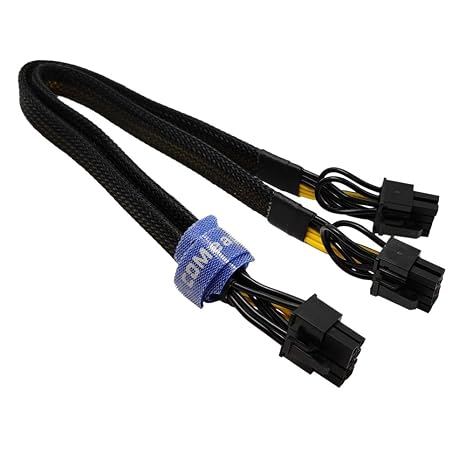
GPU Power Cable for Dell T3600 T3610 T5600 T5610 T5610 T7600 T7610 5810 T5810 T7810, 8 Pin PCIe to Dual 8 Pin(6+2) Male PCIe Power Adapter
Item #:
187896754
KES 2847
Price Details
Excluding Shipping & Custom charges ( Shipping and custom charges will be calculated on checkout )
*All items will import from US
0 ratings
Write a review
In stock
 Imported from USA store
QTY:
Order now and get it around Tuesday, August 25
Secured transaction
Ubuy works hard to protect your security and privacy. Our advanced payment security system ensures confidentiality by encrypting your information during transmission using AES (Advanced Encryption Standards) and SSL (Secure Socket Layer) protocols. Your payment details are 100% secure as we do not share your payment details with third party sellers.
Our Top Logistics Partners


This cable was only designed for the specific types of Dell motherboard as listed, not compatible with other motherboards or PSUs.

Fast
Shipping

Free
Return*

Secure Packaging

100% Original Products

PCI DSS Compliance

ISO 27001 Certified




Note: Step Down Voltage Transformer required for using electronics products of US store (110-120). Recommended power converters Buy Now.


What Stands Out
High Compatibility
Designed specifically for Dell workstations, ensuring a perfect fit with Tesla and Quadro GPUs. This compatibility minimizes the risk of power issues and maximizes device performance.
Dual 8-Pin Design
The dual 8-pin configuration supports high-performance graphics cards, providing robust power delivery and stability during demanding tasks, enhancing overall workstation efficiency.
Durable Construction
Constructed with high-quality materials, this cable ensures longevity and reliable performance, with excellent resistance to wear and tear, making it a valuable addition to any setup.
Product Details
| Connector Type | 8 Pin Male, Dual 8 Pin(6+2) Male |
| Cable Type | PCIe |
| Compatible Devices | Personal Computer |
| Other Special Features of the Product | Safe Connection Latch |
| Compatible Phone Models | No Compatible Phone Models |
| Connector Gender | Male-to-Male |
| Number of Pins | 24 |
| Wattage | 12 watts |
| Maximum Voltage | 60 volts_of_direct_current |
| Gauge | 18 |
| Recommended Uses For Product | Providing additional power to graphics cards in Dell computers |
| Indoor Outdoor Usage | Indoor, Outdoor |
| Color | Black |
| Item Shape | Round |
| Brand Name | COMeap |
| Model | BX0019-1170X |
| Item Length | 13 inches (33 cm) |
| Manufacturer | COMeap |
| UPC | 714983218924 |
| Part Number | BX0019-1170X |
| Unit Count | 1 Count |
| Item Weight | 0.02 kg |
| Brand | COMeap |
| Special Feature | Safe Connection Latch |
| Package Weight | 1 Pound (450 grams) |
Who Should Buy?

-
Professional Gamers
This cable is ideal for gamers upgrading their Dell workstations for improved graphics performance and gaming experience.
-
Content Creators
Perfect for video editors and designers needing additional power for high-performance GPUs in Dell workstations.
-
Workstation Upgraders
Users looking to enhance their Dell workstations with powerful graphics cards will benefit from this power adapter.

-
Casual Users
Individuals with basic computing needs may not require this specialized power adapter for their setups.
Product Description
GPU Power Cable for Dell T3600 T3610 T5600 T5610 T5610 T7600 T7610 5810 T5810 T7810, 8 Pin PCIe to Dual 8 Pin(6+2) Male PCIe Power Adapter 13-inch(34cm)
Have any Query? Chat with us
Customer Questions & Answers
-
Question:
What is the COMeap GPU Power Cable used for?
Answer: The COMeap GPU Power Cable is designed to provide power to high-performance graphics cards in compatible Dell workstations, such as the T3600, T3610, T5600, T5610, T7600, T7610, and others. It features an 8 Pin PCIe connector that splits into dual 8 Pin connectors, ensuring your GPU receives the necessary power for optimal performance. This cable is particularly useful for upgrading your system to support demanding applications like 3D modeling, gaming, or scientific simulations. -
Question:
How does the dual 8 Pin connector improve performance?
Answer: The dual 8 Pin connector system allows you to connect higher-end graphics cards that require more power, thus enhancing your workstation’s graphical performance. With this configuration, you can prevent power shortages and reduce the risk of instability during heavy usage, like rendering videos or running complex simulations. By ensuring a steady power supply, the COMeap cable helps users maximize their workstation’s capabilities without interruptions. -
Question:
Is the COMeap power cable compatible with all graphics cards?
Answer: No, the COMeap GPU Power Cable is specifically designed for certain Dell workstation models. It works seamlessly with graphics cards that come with 8 Pin PCIe power inputs and are supported by Dell T-series workstations. It’s essential to check your graphics card's requirements before purchasing this cable to ensure compatibility, especially for advanced GPUs that may require different connections. -
Question:
Can I use this cable with non-Dell workstations?
Answer: While the COMeap GPU Power Cable is primarily intended for specific Dell workstation models, it can be used with any system that has compatible 8 Pin PCIe power outputs. However, users should confirm the system’s capacity to support dual 8 Pin connections and that the graphics card is compatible. This flexibility allows for broader use, provided the necessary connections are available. -
Question:
What materials are used in the construction of this cable?
Answer: The COMeap GPU Power Cable is constructed from high-quality materials that ensure durability and efficient power transmission. It typically features copper wiring for optimal conductivity and a robust outer casing to protect against wear and tear. These materials help maintain performance and reliability, making it ideal for intense computing tasks without risking overheating or signal loss. -
Question:
How long is the COMeap GPU Power Cable?
Answer: The COMeap GPU Power Cable is designed with practical lengths that ensure flexibility during installation. Typically around 12 inches, this length allows for easy management of cables within the computer chassis while maintaining a tidy appearance. Proper cable management is crucial to ensure adequate airflow within the case, which ultimately enhances the overall performance and longevity of your components. -
Question:
What are the benefits of using an 8 Pin to Dual 8 Pin PCIe adapter?
Answer: Using an 8 Pin to Dual 8 Pin PCIe adapter like the COMeap provides significant benefits for powering high-performance GPUs. This setup allows for increased power distribution, reducing the risk of power limitations that can throttle performance. For gamers and professionals using advanced graphics cards for rendering or AI processing, having adequate power is essential to avoid crashes during demanding tasks. -
Question:
Is the COMeap power cable easy to install?
Answer: Yes, the installation of the COMeap GPU Power Cable is straightforward. It simply plugs into the appropriate PCIe power output on your power supply unit and into the graphics card power inputs. This makes it suitable for both tech-savvy users and those with basic computer assembly skills. Proper installation ensures a secure connection, enhancing performance stability during resource-intensive tasks. -
Question:
Does this cable support overclocking of my GPU?
Answer: While the COMeap GPU Power Cable itself does not directly enable overclocking, it ensures that your graphics card receives sufficient power during overclocking scenarios by providing stable connections. Overclocking can push your GPU beyond standard settings for improved performance, but stable power delivery is crucial to prevent instability or damage. Thus, this cable plays a supportive role in facilitating safe overclocking. -
Question:
Where can I buy COMeap GPU Power Cable for Dell T3600, T3610, T5600, T5610, T7600, and T7610?
Answer: You can purchase the COMeap GPU Power Cable for models like T3600, T3610, T5600, T5610, T7600, and T7610 from Ubuy. This platform provides a reliable shopping experience and a wide range of electronic accessories, making it a great place to find the cable you need for your workstation's power needs.
COMeap Power Cords Editorial Review
**** The power cable designed specifically for Dell Precision systems like the T7810, T5810, and T3610 has garnered positive feedback from users for its effectiveness in facilitating the connection of two PCI Express video cards. Many customers have noted that the cable works flawlessly, delivering power reliably even under stress tests. Users have successfully paired it with various graphics cards, including NVIDIA GTX models and the AMD RX580, which speaks to its broad compatibility within the specified Dell system range. However, some users experienced minor installation quirks due to the layout of their Dell cases, which occasionally required adjustments such as the removal of plastic coverings to achieve a proper fit. There was also feedback regarding cable length; while generally adequate, some users noted that short cables can lead to a tight installation especially for larger GPUs. Additionally, some users suggested clearer labeling on the cable’s connectors would simplify the installation process. Overall, the product received high praise for its quality, reliability, and compatibility, especially when the recommended specifications are observed. Buyers are advised to ensure their power supply can adequately handle the power draw from their graphics cards to avoid potential hazards. **
Customer Reviews & Ratings
1 customers ratings
-
5 Star
100%
-
4 Star
0%
-
3 Star
0%
-
2 Star
0%
-
1 Star
0%
Review this product
Share your thoughts with other customers
Pros
- Excellent compatibility with Dell Precision systems.
- Reliable power delivery under load.
- High-quality Construction.
- User-friendly, fulfilling the intended purpose effectively.
Cons
- Some users find cable lengths a bit short for larger GPUs.
Platform Trust & Buyer Confidence

MA
Mohammad
Verified buyer
“Excellent quality and original too,when ubuy send original things I will appreciate that ,I very satisfied thank you”
23 July 2026 · via Trustpilot
CK
Chitra
Verified buyer
“The order and delivery progress was communicated very well. Package arrived within the estimated time. Products arrived as expected in good condition.”
22-Jul-26 · via Trustpilot
K
kund
Verified buyer
“Good supply of products. Safe payment methods, and shipment worldwide! Genuine products.”
23-Jul-26 · via Trustpilot
OO
Onesi
Verified buyer
“Was my first time buying a product from Ubuy, but I found it so helpful. This is reliable. Gonna place a new order!”
22 July 2026 · via Trustpilot
SJ
SAO JOHN
Verified buyer
“Ubuy is a great online platform to buy stuff. Reliable, fast delivery time and great value for money. I've been using Ubuy online shopping platform for three years now and will continue to do so.”
23 July 2026 · via Trustpilot
Secure Checkout
Global Delivery
Easy Returns
Genuine Products
Product Price History
Important information
- Limitations : For products shipped internationally, please note that any manufacturer warranty may not be valid; manufacturer service options may not be available; product manuals, instructions, and safety warnings may not be in destination country languages; the products (and accompanying materials) may not be designed in accordance with destination country standards, specifications, and labeling requirements; and the products may not conform to destination country voltage and other electrical standards (requiring use of an adapter or converter if appropriate). The recipient is responsible for assuring that the product can be lawfully imported to the destination country. When ordering from Ubuy or its affiliates, the recipient is the importer of record and must comply with all laws and regulations of the destination country.
- Not all the products listed on Ubuy are for sale, as Ubuy is a global search engine. Products are subject to export/trade regulations.
KES 2847
Order now and get it around Tuesday, August 25
This item is not restrict in my country.(Please click on above link if this item is not restrict in your country, So our team will review and allow.)
QTY:
Secured transaction
PCI DSS compliant and ISO 27001:2022 certified, with encrypted payments and full buyer protection on every order.
Our Top Logistics Partners
Fastest cross-border delivery
Features & Benefits
- Designed specifically for Dell T3600 and compatible models.
- Features a PCIe 8 pin male end for Dell motherboard connection.
- Includes two adaptable 8 pin (6+2) male ends for video graphics cards.
- Compatible with major graphics card manufacturers like ASUS, Gigabyte, and NVIDIA.
- Length of 13 inches with a standard tin-coating copper wire.
- Incompatible with other brand motherboards or PSUs to prevent damage.
Ubuy Assurance
Experience worry-free shopping with 100% original products, PCI DSS-compliant payment security, ISO 27001-certified data protection, the fastest cross-border delivery, free returns *, and secure packaging on every order.